
MU's Twin Towers East & West (2026)
Creator: DontSmokePlants · 2026-09-11 · Maps · Free on Eaglercraft Studio
Download MU's Twin Towers East & West (2026) — free Minecraft map. Created by DontSmokePlants. Tagged building, map, other, realism. Get the world/schematic file when available and explore more free maps on Eaglercraft Studio.
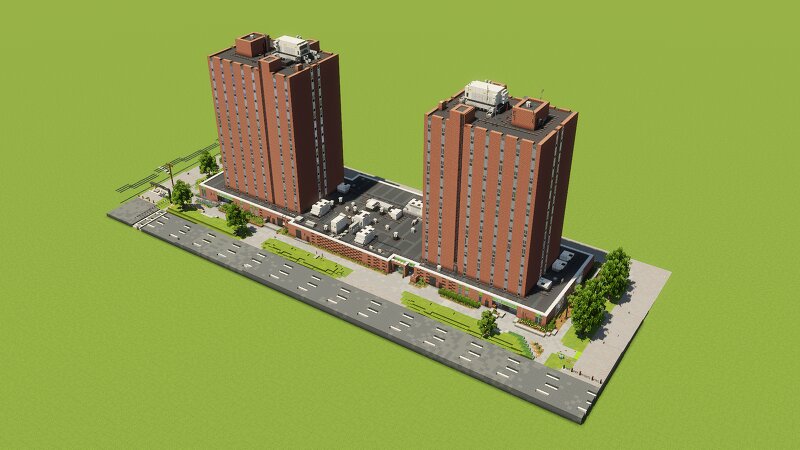
Creator notes
Marshall University's Twin Towers East & West (2026) Constructed in 1968, opening in 1969, and housing many college students since then, Twin Towers East & West is one of the tallest dormitories across campus. Standing at approximately 43 meters tall, each tower has 15 floors with a large recreational area located on the 1st floor and a marketplace connecting to both towers. NOTICE! This build uses mods that add more block varieties. These mods are required to be downloaded in order for the build to render properly. All mods use Minecraft version 1.21.11 with the Fabric mod loader. LAG WARNING! This build uses various display entities. Ensure that your computer can handle it. Mod Installation Guide JAVA INSTALLATION Java: https://www.java.com/en/ Download Java for Desktops → Download Java for Desktops (again) → Open "jre-8u503-windows-x64" or whatever → Install Java Guide: https://www.youtube.com/watch?v=mMHPi0OHmIE FABRIC INSTALLATION Fabric Loader: https://fabricmc.net/ Download → Download for Windows (or other option) → Open "fabric-installer" → Select "Minecraft Version: 1.21.11" → Install Fabric Guide: https://www.youtube.com/watch?v=RpN94a2q8JI Fabric API: https://modrinth.co
Added value
What’s included on this page
Preview, categories, compatibility, and tools on this page — not a bare file mirror.
- Creator
- DontSmokePlants
- Source
- Minecraft downloads library on Eaglercraft Studio
- Type
- Minecraft map / world
- Price
- Free download on Eaglercraft Studio
- Curation
- Listed with credit to DontSmokePlants · studio preview & install guide
- Compatible with
- Minecraft Java (match version / loader in facts)
- Tags
- Building, Map, Other, Realism, Showcase
Install guide
How to install this free Minecraft map
Eaglercraft Studio map listing with preview, creator credit, and install steps for Java worlds.
- 1Download the world archive (.zip / .mcworld / schematic) when available.
- 2For Java: extract into your .minecraft/saves folder (or import via your launcher).
- 3Launch Minecraft, select the world, and play. Keep a backup before overwriting saves.
Check any version notes in the facts panel — maps often target a specific Minecraft release.
Related free maps
More curated maps from the same library section.

CraftyFoxe · 761 diamonds · 418 views

CraftyFoxe · 761 diamonds · 339 views

CraftyFoxe · 761 diamonds · 319 views

CraftyFoxe · 761 diamonds · 306 views