
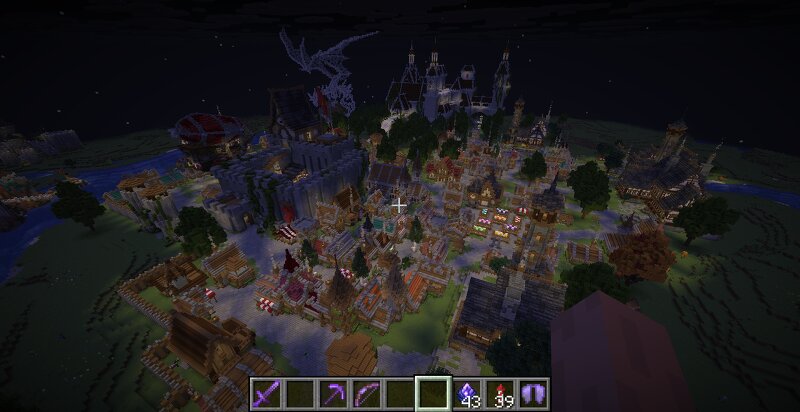
My eclectic world, featuring my own builds alongside creations gathered from other builders, plus many new features (26.3).
Creator: tuanhochanh11 · 2026-09-12 · Maps · Free on Eaglercraft Studio
Download My eclectic world, featuring my own builds alongside creations gathere — free Minecraft map. Created by tuanhochanh11. Tagged other. Get the world/schematic file when available and explore more free maps on Eaglercraft Studio.
Creator notes
This is a world I started playing in over a year ago, and it has gradually grown into a large medieval and fantasy-inspired world with a mix of real-world-inspired architecture. Throughout the project, I’ve recreated and incorporated many impressive builds that I found online, while also adding a number of my own creations to make the world feel more personal and unique. The map includes castles, villages, towns, ruins, landmarks, and various fantasy structures, creating a world with many different areas to explore. To make exploration and gameplay more interesting, I’ve also added several custom features using datapacks and command blocks. The world contains hidden and hard-to-find portals that can transport you to different locations, along with various small secrets and interactive elements waiting to be discovered. If you’d like to see more of the world before downloading it, you can get a preview through the YouTube link I’ve provided.
Added value
What’s included on this page
Preview, categories, compatibility, and tools on this page — not a bare file mirror.
- Creator
- tuanhochanh11
- Source
- Minecraft downloads library on Eaglercraft Studio
- Type
- Minecraft map / world
- Price
- Free download on Eaglercraft Studio
- Curation
- Listed with credit to tuanhochanh11 · studio preview & install guide
- Compatible with
- Minecraft Java (match version / loader in facts)
- Tags
- Other
Install guide
How to install this free Minecraft map
Eaglercraft Studio map listing with preview, creator credit, and install steps for Java worlds.
- 1Download the world archive (.zip / .mcworld / schematic) when available.
- 2For Java: extract into your .minecraft/saves folder (or import via your launcher).
- 3Launch Minecraft, select the world, and play. Keep a backup before overwriting saves.
Check any version notes in the facts panel — maps often target a specific Minecraft release.
Related free maps
More curated maps from the same library section.

CraftyFoxe · 761 diamonds · 418 views

CraftyFoxe · 761 diamonds · 339 views

CraftyFoxe · 761 diamonds · 319 views

CraftyFoxe · 761 diamonds · 306 views