
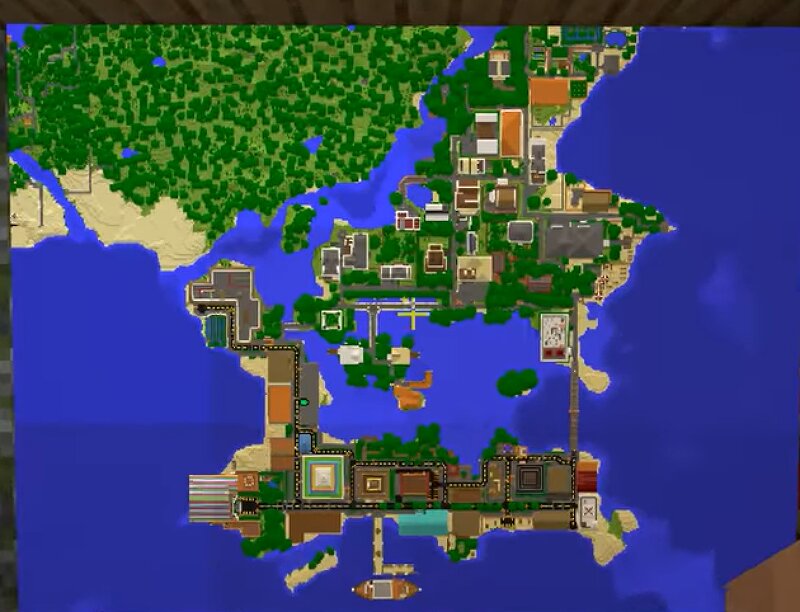
My Island Paradise (Lost?)
Creator: Timberdoodle · 2026-09-22 · Maps · Free on Eaglercraft Studio
Download My Island Paradise (Lost?) — free Minecraft map. Created by Timberdoodle. Tagged cities, complex, large, lostworld. Get the world/schematic file when available and explore more free maps on Eaglercraft Studio.
Creator notes
This world I have been working on since 1.13, almost 7/8 years ago. I have always come back to it, working on building up the island and expanding the cities and towns that dot the landscape with the blueprints and plans I wrote down. You can really see the improvements over the years, I hope. This summer, the drive in my PC that housed Minecraft went bad. Luckily I was able to salvage this world to a USB before that became impossible thankfully, but now I don't have a computer with enough storage to expand and revisit this world (for now, hopefully). Because the degradation of my drive was so sudden, I do not have any pictures or videos of the world that were taken recently. If you want to go between the Island and the mainland, there is a command block teleport in the two airports. The St. Claire Island project I was working on is incomplete with only ~30 to 40% completion, but the mainland has been finished for several years. I had everything planned and blueprints are in the monument on Capital Island if you feel like finishing the world. I really hope I can someday come back and finally put this years-long project to rest but as of now that is just a dream. I hope you enjoy vi
Added value
What’s included on this page
Preview, categories, compatibility, and tools on this page — not a bare file mirror.
- Creator
- Timberdoodle
- Source
- Minecraft downloads library on Eaglercraft Studio
- Type
- Minecraft map / world
- Price
- Free download on Eaglercraft Studio
- Curation
- Listed with credit to Timberdoodle · studio preview & install guide
- Compatible with
- Minecraft Java (match version / loader in facts)
- Tags
- Cities, Complex, Large, Lostworld, Massive, Nostalgia
Install guide
How to install this free Minecraft map
Eaglercraft Studio map listing with preview, creator credit, and install steps for Java worlds.
- 1Download the world archive (.zip / .mcworld / schematic) when available.
- 2For Java: extract into your .minecraft/saves folder (or import via your launcher).
- 3Launch Minecraft, select the world, and play. Keep a backup before overwriting saves.
Check any version notes in the facts panel — maps often target a specific Minecraft release.
Related free maps
More curated maps from the same library section.

CraftyFoxe · 761 diamonds · 418 views

CraftyFoxe · 761 diamonds · 339 views

CraftyFoxe · 761 diamonds · 319 views

CraftyFoxe · 761 diamonds · 306 views