
My Underground City and USS Missouri / USS Essex Commemorative Edition, Opening Day
Creator: kencorreia · 2026-09-29 · Maps · Free on Eaglercraft Studio
Download My Underground City and USS Missouri / USS Essex Commemorative Edition — free Minecraft map. Created by kencorreia. Tagged aircraft, aircraft carrier, battleship, carrier. Get the world/schematic file when available and explore more free maps on Eaglercraft Studio.
Creator notes
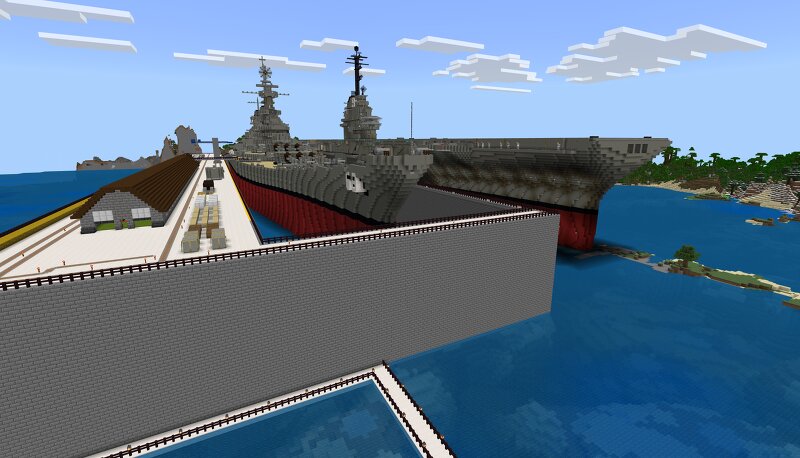
Yes, Folks! This is THE MAP that launched it all on the 12th of April, 2026- the moment I restarted my account activity with the FULLY REMODELED Underground City. This was a supplement to the original My Underground City , that was originally released for viewing and download in February 2013! At this point, I had been showing the details of this city on YouTube , but I needed to find a way to show it to a wider audience. Remembering that I had used Planet Minecraft earlier, I decided to update my page with new content, hoping lots of people would see it and download it for their own use. Since the close of Season 5 of the Xiamian City Chronicles, I had experimented with the lighting on the two ships, adding end rods to the upper decks to give a more modern look, as well as increased use of ceiling textures to give a more realistic feel. Feel free to download this commemorative edition map, as it is the only way to see this next step in the evolution of this world!
Added value
What’s included on this page
Preview, categories, compatibility, and tools on this page — not a bare file mirror.
- Creator
- kencorreia
- Source
- Minecraft downloads library on Eaglercraft Studio
- Type
- Minecraft map / world
- Price
- Free download on Eaglercraft Studio
- Curation
- Listed with credit to kencorreia · studio preview & install guide
- Compatible with
- Minecraft Java (match version / loader in facts)
- Tags
- Aircraft, Aircraft Carrier, Battleship, Carrier, City, Essex
Install guide
How to install this free Minecraft map
Eaglercraft Studio map listing with preview, creator credit, and install steps for Java worlds.
- 1Download the world archive (.zip / .mcworld / schematic) when available.
- 2For Java: extract into your .minecraft/saves folder (or import via your launcher).
- 3Launch Minecraft, select the world, and play. Keep a backup before overwriting saves.
Check any version notes in the facts panel — maps often target a specific Minecraft release.
Related free maps
More curated maps from the same library section.

CraftyFoxe · 761 diamonds · 418 views

CraftyFoxe · 761 diamonds · 339 views

CraftyFoxe · 761 diamonds · 319 views

CraftyFoxe · 761 diamonds · 306 views