
Nevúnat Continent - Valorstone XIV Century
Creator: AstralPixel_ · 2026-09-01 · Maps · Free on Eaglercraft Studio
Download Nevúnat Continent - Valorstone XIV Century — free Minecraft map. Created by AstralPixel_. Tagged medieval, minecraftmap, other, terrain. Get the world/schematic file when available and explore more free maps on Eaglercraft Studio.
Creator notes
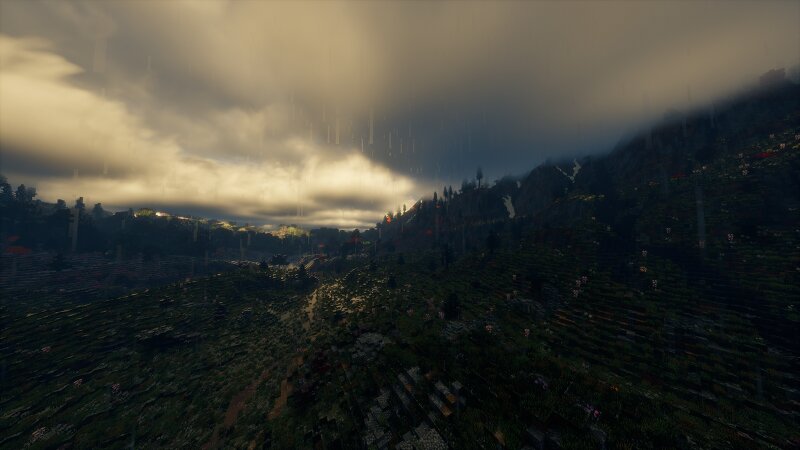
I posted the map for my project earlier, here's a little look into the what the terrain looks like in-game now. Development has been moving forward but very slowly and we're now looking to expand the team behind it.We're creating a medieval roleplay server set in a grounded 14th century inspired world, with a focus on politics, professions, trade, exploration, and player-driven stories.Currently looking for people interested in helping with things such as; Writing & Lore, Quest/NPC Development, Building & World Design, 3D Modeling/2D sprite creations, Towny or other similar plugin setups and Plugin development.You don't need years of experience. What matters most is that you're reliable, creative, and genuinely interested in helping build something special.If this caught your attention from the map showcase and you'd like to be part of the team behind the world, feel free to reach out or join our Discord: discord.gg/qWvaDR9Tq
Added value
What’s included on this page
Preview, categories, compatibility, and tools on this page — not a bare file mirror.
- Creator
- AstralPixel_
- Source
- Minecraft downloads library on Eaglercraft Studio
- Type
- Minecraft map / world
- Price
- Free download on Eaglercraft Studio
- Curation
- Listed with credit to AstralPixel_ · studio preview & install guide
- Compatible with
- Minecraft Java (match version / loader in facts)
- Tags
- Medieval, Minecraftmap, Other, Terrain
Install guide
How to install this free Minecraft map
Eaglercraft Studio map listing with preview, creator credit, and install steps for Java worlds.
- 1Download the world archive (.zip / .mcworld / schematic) when available.
- 2For Java: extract into your .minecraft/saves folder (or import via your launcher).
- 3Launch Minecraft, select the world, and play. Keep a backup before overwriting saves.
Check any version notes in the facts panel — maps often target a specific Minecraft release.
Related free maps
More curated maps from the same library section.

CraftyFoxe · 761 diamonds · 418 views

CraftyFoxe · 761 diamonds · 339 views

CraftyFoxe · 761 diamonds · 319 views

CraftyFoxe · 761 diamonds · 306 views