
Nhà hàng / House of Trade
Creator: misterich · 2026-09-12 · Maps · Free on Eaglercraft Studio
Download Nhà hàng / House of Trade — free Minecraft map. Created by misterich. Tagged asia, asian, china, chinese. Get the world/schematic file when available and explore more free maps on Eaglercraft Studio.
Creator notes
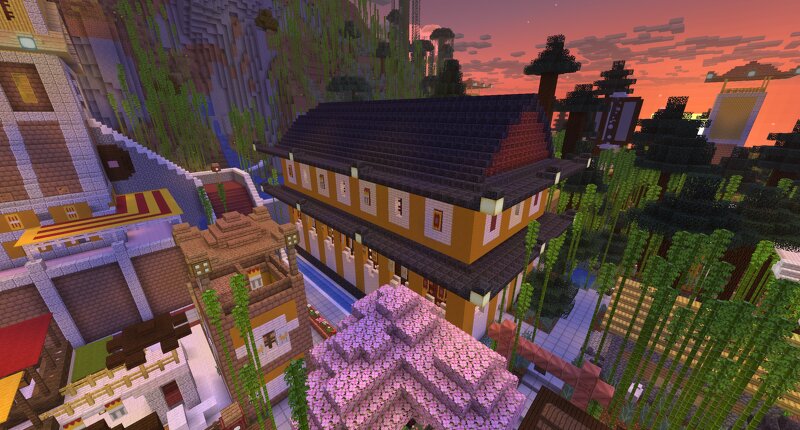
The Nhà hàng —meaning House of Trade —is a market hall I conceived and built in the Pachhóng district of the city of the same name within the RP world . It captures the spirit of a Far Eastern medieval shopping mall. Structure Description The rectangular building is situated on a slope and features a non-accessible foundation to compensate for the incline. It is divided into two stories. It is oriented so that the street runs lengthwise through the center of the building. Entrances are located in the middle of the short sides. A third entrance is found on the southeastern long side, where the building directly adjoins the old marketplace. A spiral staircase connecting the two floors is located in the corner of the structure, between this entrance and the eastern one. The floors themselves feature a uniform layout, consisting of market stall niches facing the central thoroughfare. The stalls offer a wide array of goods from merchants hailing from all over the world, and are fitted out accordingly. The following merchants are currently present: - Chicken merchant from Kaysang - Beekeeping supplies merchant - Persian textile merchant (specializing in carpets) - Batavian diamond mercha
Added value
What’s included on this page
Preview, categories, compatibility, and tools on this page — not a bare file mirror.
- Creator
- misterich
- Source
- Minecraft downloads library on Eaglercraft Studio
- Type
- Minecraft map / world
- Price
- Free download on Eaglercraft Studio
- Curation
- Listed with credit to misterich · studio preview & install guide
- Compatible with
- Minecraft Java (match version / loader in facts)
- Tags
- Asia, Asian, China, Chinese, Fareast, Fernerosten
Install guide
How to install this free Minecraft map
Eaglercraft Studio map listing with preview, creator credit, and install steps for Java worlds.
- 1Download the world archive (.zip / .mcworld / schematic) when available.
- 2For Java: extract into your .minecraft/saves folder (or import via your launcher).
- 3Launch Minecraft, select the world, and play. Keep a backup before overwriting saves.
Check any version notes in the facts panel — maps often target a specific Minecraft release.
Related free maps
More curated maps from the same library section.

CraftyFoxe · 761 diamonds · 418 views

CraftyFoxe · 761 diamonds · 339 views

CraftyFoxe · 761 diamonds · 319 views

CraftyFoxe · 761 diamonds · 306 views