
North Hall | Stephen F. Austin State University
Creator: Studio Colton · 2026-09-04 · Maps · Free on Eaglercraft Studio
Download North Hall | Stephen F. Austin State University — free Minecraft map. Created by Studio Colton. Tagged academic, america, austin, campus. Get the world/schematic file when available and explore more free maps on Eaglercraft Studio.
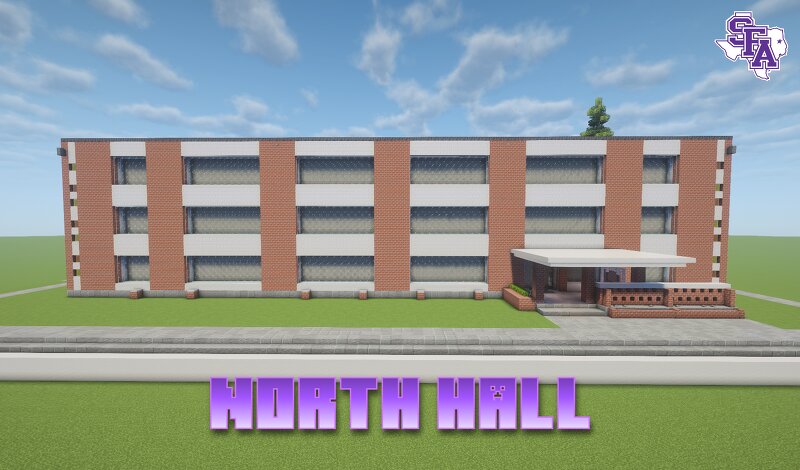
Creator notes
Meet The Build North Hall, located on the Stephen F. Austin State University campus in Nacogdoches, Texas, was constructed in 1960 as part of a major period of campus expansion during the mid-20th century. Financed alongside South Hall, the building was originally planned to include separate housing for male and female students, but overwhelming demand from female students led both halls to open as women’s residence halls. Architecturally, North Hall reflects the modern, utilitarian style of postwar college dormitories, emphasizing functional student housing and communal living rather than the Classical Revival architecture found in SFA’s older buildings such as the Austin Building. Its construction came during a period when SFA was rapidly expanding its facilities and enrollment, with North and South Halls among the new dormitories built as the college developed into a larger regional institution. Today, North Hall continues to serve as student housing, now offering co-ed, suite-style accommodations for non-first-year students, with community amenities including laundry and a kitchen. As one of SFA’s early 1960s residence halls, North Hall is therefore an important example of the
Added value
What’s included on this page
Preview, categories, compatibility, and tools on this page — not a bare file mirror.
- Creator
- Studio Colton
- Source
- Minecraft downloads library on Eaglercraft Studio
- Type
- Minecraft map / world
- Price
- Free download on Eaglercraft Studio
- Curation
- Listed with credit to Studio Colton · studio preview & install guide
- Compatible with
- Minecraft Java (match version / loader in facts)
- Tags
- Academic, America, Austin, Campus, City, College
Install guide
How to install this free Minecraft map
Eaglercraft Studio map listing with preview, creator credit, and install steps for Java worlds.
- 1Download the world archive (.zip / .mcworld / schematic) when available.
- 2For Java: extract into your .minecraft/saves folder (or import via your launcher).
- 3Launch Minecraft, select the world, and play. Keep a backup before overwriting saves.
Check any version notes in the facts panel — maps often target a specific Minecraft release.
Related free maps
More curated maps from the same library section.

CraftyFoxe · 761 diamonds · 418 views

CraftyFoxe · 761 diamonds · 339 views

CraftyFoxe · 761 diamonds · 319 views

CraftyFoxe · 761 diamonds · 306 views