
Ocean Nature Assets Set v1.0
Creator: JustPinkCake · 2026-09-26 · Maps · Free on Eaglercraft Studio
Download Ocean Nature Assets Set v1.0 — free Minecraft map. Created by JustPinkCake. Tagged animal, asset, assets, building. Get the world/schematic file when available and explore more free maps on Eaglercraft Studio.
Creator notes
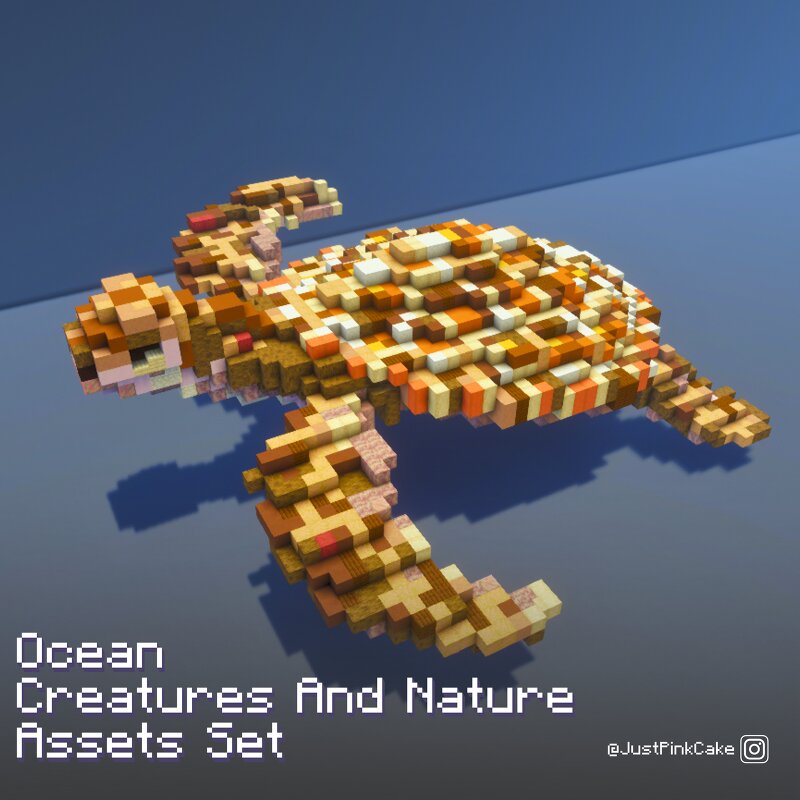
Minecraft Java Assets - "Ocean Nature Set 1.0" Map made by: JustPinkCake Compatible with 1.20+ versions This Asset Pack includes 25 detailed assets & building stuff that will provide some of your future project life and a unique look. It include: 6 Corals 2 Jellyfish 1 Ray 1 Sea turtle 2 Tuna Fish 2 Cuttlefish And more! I also added 2 variants in some assets This is the second one of my Weekly Asset Set that i been posting recently. Check the previous one "Tropical & Jungle Set 1.0" Here! https://www.planetminecraft.com/project/tropical-amp-jungle-assets-set-v1-0/ I also leave another link to the water tutorial in case that you want to try it in your builds! https://www.planetminecraft.com/project/how-to-make-realistic-water-in-minecraft-using-stained-glass-tutorial/ The Free Version includes 5 of the 25 original Asset Pack which will be available to download in a few days (in this same post) The archive is a .schem file I have plans to update and make more assets with this topic so stay tune! Feel free to tell me what you think! i will read your coments! :D Be ready for the week three Asset set!! Can you guess the theme?
Added value
What’s included on this page
Preview, categories, compatibility, and tools on this page — not a bare file mirror.
- Creator
- JustPinkCake
- Source
- Minecraft downloads library on Eaglercraft Studio
- Type
- Minecraft map / world
- Price
- Free download on Eaglercraft Studio
- Curation
- Listed with credit to JustPinkCake · studio preview & install guide
- Compatible with
- Minecraft Java (match version / loader in facts)
- Tags
- Animal, Asset, Assets, Building, Fish, Free
Install guide
How to install this free Minecraft map
Eaglercraft Studio map listing with preview, creator credit, and install steps for Java worlds.
- 1Download the world archive (.zip / .mcworld / schematic) when available.
- 2For Java: extract into your .minecraft/saves folder (or import via your launcher).
- 3Launch Minecraft, select the world, and play. Keep a backup before overwriting saves.
Check any version notes in the facts panel — maps often target a specific Minecraft release.
Related free maps
More curated maps from the same library section.

CraftyFoxe · 761 diamonds · 418 views

CraftyFoxe · 761 diamonds · 339 views

CraftyFoxe · 761 diamonds · 319 views

CraftyFoxe · 761 diamonds · 306 views