
Oneblock But it's Random Drops!
Creator: Potato23979 · 2026-09-18 · Maps · Free on Eaglercraft Studio
Download Oneblock But it's Random Drops! — free Minecraft map. Created by Potato23979. Tagged boss, challenge adventure, end, enddimension. Get the world/schematic file when available and explore more free maps on Eaglercraft Studio.
Creator notes
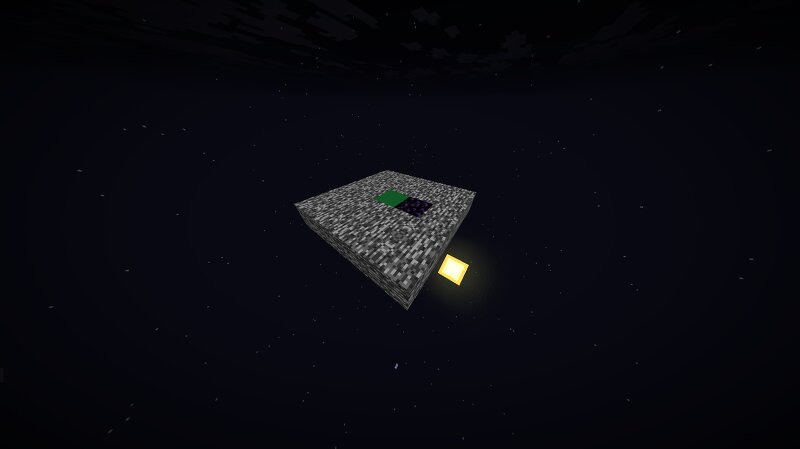
PLEASE READ BELOW!!! Oneblock But it's Random Drops! Welcome to oneblock but it's random drops. In this map there is a grassblock and an obsidian block with bedrock around it for you to stand on. Instead of normal oneblock where the oneblock drops what you can see, instead the blocks drop random things. If you didn't know the obsidian and grass blocks both regenerate in under a second. Main Goal Your main goal in this map is to defeat the enderdragon by somehow going to the end. It is very easy to do the first steps but the hardest part is to not die from the enderdragon damaging you! INFO You start off with an unbreakable diamond kit to use to defeat the Enderdragon and to mine the blocks. Keep inventory is turned on and mob griefing is off! You have an infinitely regenerating stack of arrows in the last slot of your inventory as long as you visit the overworld by dying frequently. The obsidian block always drops an eye of ender for you to use. To get the end portal frame blocks first you need to mine the grass block and then mine the next block after that until you get the end portal frame. This map is very simple and it wont take over a minute or two to reach the end dimension e
Added value
What’s included on this page
Preview, categories, compatibility, and tools on this page — not a bare file mirror.
- Creator
- Potato23979
- Source
- Minecraft downloads library on Eaglercraft Studio
- Type
- Minecraft map / world
- Price
- Free download on Eaglercraft Studio
- Curation
- Listed with credit to Potato23979 · studio preview & install guide
- Compatible with
- Minecraft Java (match version / loader in facts)
- Tags
- Boss, Challenge Adventure, End, Enddimension, Oneblock, Progression
Install guide
How to install this free Minecraft map
Eaglercraft Studio map listing with preview, creator credit, and install steps for Java worlds.
- 1Download the world archive (.zip / .mcworld / schematic) when available.
- 2For Java: extract into your .minecraft/saves folder (or import via your launcher).
- 3Launch Minecraft, select the world, and play. Keep a backup before overwriting saves.
Check any version notes in the facts panel — maps often target a specific Minecraft release.
Related free maps
More curated maps from the same library section.

CraftyFoxe · 761 diamonds · 418 views

CraftyFoxe · 761 diamonds · 339 views

CraftyFoxe · 761 diamonds · 319 views

CraftyFoxe · 761 diamonds · 306 views