
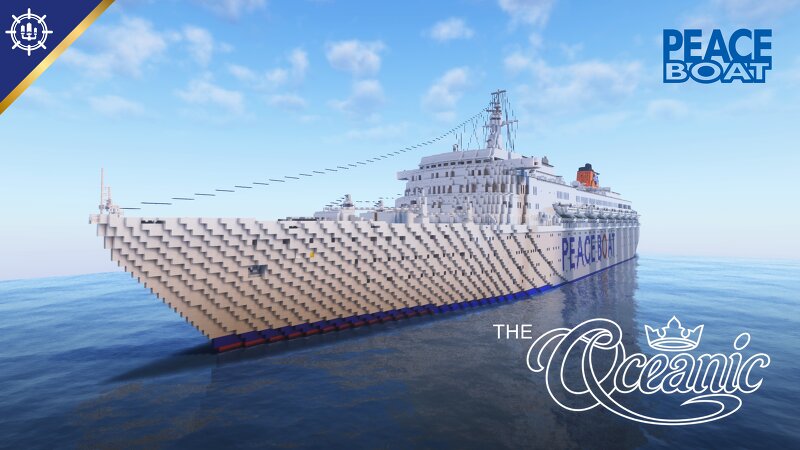
Peace Boat's THE OCEANIC
Creator: Maritime Nexus · 2026-09-18 · Maps · Free on Eaglercraft Studio
Download Peace Boat's THE OCEANIC — free Minecraft map. Created by Maritime Nexus. Tagged boat, homelines, oceanic, peace. Get the world/schematic file when available and explore more free maps on Eaglercraft Studio.
Creator notes
THE OCEANIC Peace Boat Welcome to Peace Boat's The Oceanic in Minecraft! This is SS Oceanic in her late stage career service with Peace Boat. Having been with many operators, her final operator was Peace Boat Organization. She served from 2009-2012 and was one of the last of the golden age ocean liners to sail into the 2010s. She lived a wonderful 47 years of service and was a pioneer in modern cruise ship design and features. This build also concludes the Oceanic Saga. Thank you for following along and explore the other maps if you haven't already! Links down below. SS OCEANIC MAPS: Home Lines SS OCEANIC Premier Cruises STARSHIP OCEANIC What's Changed & Build Details Scale: 1.8:1 For Minecraft Versions : 26.50 (Bedrock) & 26.3 (Java) What's Changed: - Small Facelift to public rooms and carpet changes. - Only Penthouse Suites and Premier Deck Cabins have been restyled. (Other cabins are unchanged) - Tropicana Club now becomes Actors Lounge & Bar / Tropicana Deli. - Seminar Rooms have been added to Lounge Deck. - Bow Thrusters Added and Crew Bar added very aft. - Sports Court Added aft. - New Cabins replace former Conference Room/former Chapel space Usage For Use: If you wish to use
Added value
What’s included on this page
Preview, categories, compatibility, and tools on this page — not a bare file mirror.
- Creator
- Maritime Nexus
- Source
- Minecraft downloads library on Eaglercraft Studio
- Type
- Minecraft map / world
- Price
- Free download on Eaglercraft Studio
- Curation
- Listed with credit to Maritime Nexus · studio preview & install guide
- Compatible with
- Minecraft Java (match version / loader in facts)
- Tags
- Boat, Homelines, Oceanic, Peace, Peaceboat, Peaceboatoceanic
Install guide
How to install this free Minecraft map
Eaglercraft Studio map listing with preview, creator credit, and install steps for Java worlds.
- 1Download the world archive (.zip / .mcworld / schematic) when available.
- 2For Java: extract into your .minecraft/saves folder (or import via your launcher).
- 3Launch Minecraft, select the world, and play. Keep a backup before overwriting saves.
Check any version notes in the facts panel — maps often target a specific Minecraft release.
Related free maps
More curated maps from the same library section.

CraftyFoxe · 761 diamonds · 418 views

CraftyFoxe · 761 diamonds · 339 views

CraftyFoxe · 761 diamonds · 319 views

CraftyFoxe · 761 diamonds · 306 views