
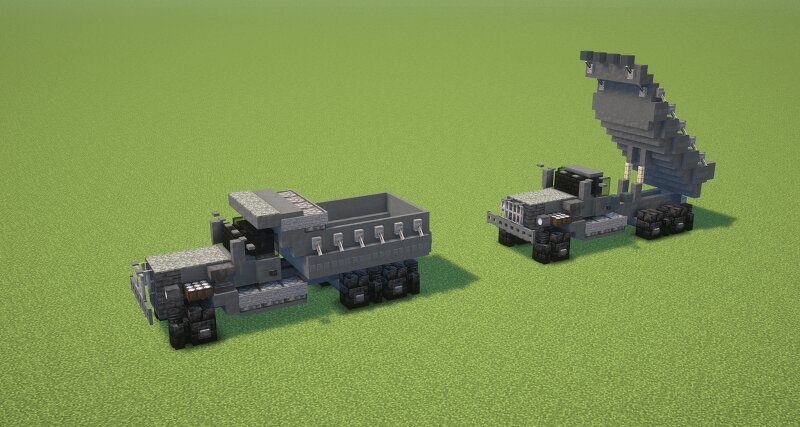
Peterbilt Model 364 Dump Truck (1.5:1 Scale)
Creator: GARRETT2BY4 · 2026-09-03 · Maps · Free on Eaglercraft Studio
Download Peterbilt Model 364 Dump Truck (1.5:1 Scale) — free Minecraft map. Created by GARRETT2BY4. Tagged america, american, construction, dump. Get the world/schematic file when available and explore more free maps on Eaglercraft Studio.
Creator notes
Peterbilt Model 364 is another WWII-era heavy truck, and dump-truck versions were produced for military service. Peterbilt introduced the Model 364 in 1941 as a heavier-duty truck, initially aimed at logging and other severe-duty work. With U.S. entry into WWII, the design was adapted for military service. Peterbilt itself specifically identifies the Model 364 as its principal WWII military workhorse. One particularly interesting contract was for the U.S. Navy. Historical model information indicates 28 Model 364s were produced for the Navy in 1942. Comissioned by: Orion IMPORTANT: Before pasting schematic input the following commands: //perf neighbors off //perf updates off //paste -e Texture Pack: Reflector's General Military Pack 2.0 Shaders Pack: Complimentary Unbound Game Version: Java 1.21.11 Please leave a diamond and follow if you enjoy this type of content! :)
Added value
What’s included on this page
Preview, categories, compatibility, and tools on this page — not a bare file mirror.
- Creator
- GARRETT2BY4
- Source
- Minecraft downloads library on Eaglercraft Studio
- Type
- Minecraft map / world
- Price
- Free download on Eaglercraft Studio
- Curation
- Listed with credit to GARRETT2BY4 · studio preview & install guide
- Compatible with
- Minecraft Java (match version / loader in facts)
- Tags
- America, American, Construction, Dump, Land Structure, Military
Install guide
How to install this free Minecraft map
Eaglercraft Studio map listing with preview, creator credit, and install steps for Java worlds.
- 1Download the world archive (.zip / .mcworld / schematic) when available.
- 2For Java: extract into your .minecraft/saves folder (or import via your launcher).
- 3Launch Minecraft, select the world, and play. Keep a backup before overwriting saves.
Check any version notes in the facts panel — maps often target a specific Minecraft release.
Related free maps
More curated maps from the same library section.

CraftyFoxe · 761 diamonds · 418 views

CraftyFoxe · 761 diamonds · 339 views

CraftyFoxe · 761 diamonds · 319 views

CraftyFoxe · 761 diamonds · 306 views