
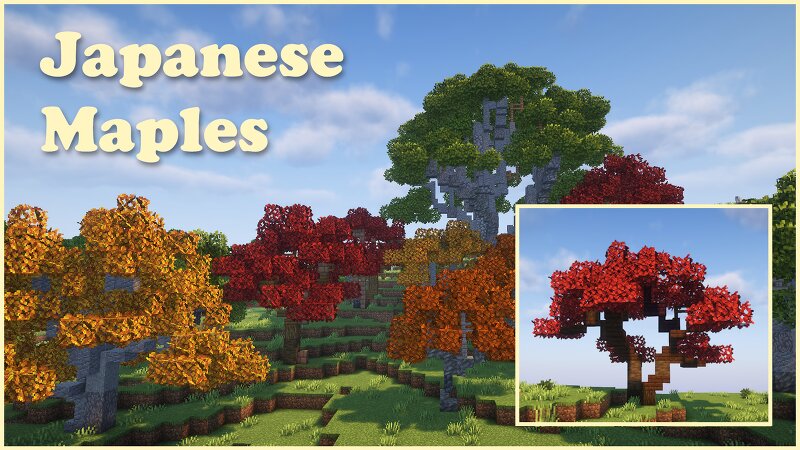
Pingvo's Japanese Maple tree pack
Creator: PingvoMC · 2026-09-26 · Maps · Free on Eaglercraft Studio
Download Pingvo's Japanese Maple tree pack — free Minecraft map. Created by PingvoMC. Tagged customtrees, japanese, maple, pack. Get the world/schematic file when available and explore more free maps on Eaglercraft Studio.
Creator notes
-=-=-=-= Pingvo's Japanese Maple Pack =-=-=-=- I am so excited to share this pack with you all. I have been waiting eagerly for the new leaves. Japanese maple trees (acer palmatum) come in a wild variety of colours and sizes. The leaves of the different sub-species change to different colours at different times which makes them perfect decorative trees to add colour all year round. I have chosen 7 different kinds based on the colour of leaves during spring. All 48 trees are individually handmade. I was debating whether to add class to some of the trees to make them match their real live inspirations better. But I decided not to do so, to keep them more userfriendly, survival friendly and overall more versatile. Overview of the tree kinds Painted Maple ( Acer Truncatum mono) Bloodgood shin -deshojo first flame orange dream summer gold Mikawa yatsubusa Get this pack for just €1,00 on ko-fi Or become a patreon and get acces to all (previous and future) downloads Included: - World map - 48 tree schematics: 12 painted maples 6 bloodgoods 6 sin deshojo 6 first flame 6 orange dream 6 summer gold 6 mikawa yatsubusa Important : Extract (un-zip) the downloaded map,place the WORLD map into yo
Added value
What’s included on this page
Preview, categories, compatibility, and tools on this page — not a bare file mirror.
- Creator
- PingvoMC
- Source
- Minecraft downloads library on Eaglercraft Studio
- Type
- Minecraft map / world
- Price
- Free download on Eaglercraft Studio
- Curation
- Listed with credit to PingvoMC · studio preview & install guide
- Compatible with
- Minecraft Java (match version / loader in facts)
- Tags
- Customtrees, Japanese, Maple, Pack, Pingvo, Poplar
Install guide
How to install this free Minecraft map
Eaglercraft Studio map listing with preview, creator credit, and install steps for Java worlds.
- 1Download the world archive (.zip / .mcworld / schematic) when available.
- 2For Java: extract into your .minecraft/saves folder (or import via your launcher).
- 3Launch Minecraft, select the world, and play. Keep a backup before overwriting saves.
Check any version notes in the facts panel — maps often target a specific Minecraft release.
Related free maps
More curated maps from the same library section.

CraftyFoxe · 761 diamonds · 418 views

CraftyFoxe · 761 diamonds · 339 views

CraftyFoxe · 761 diamonds · 319 views

CraftyFoxe · 761 diamonds · 306 views