
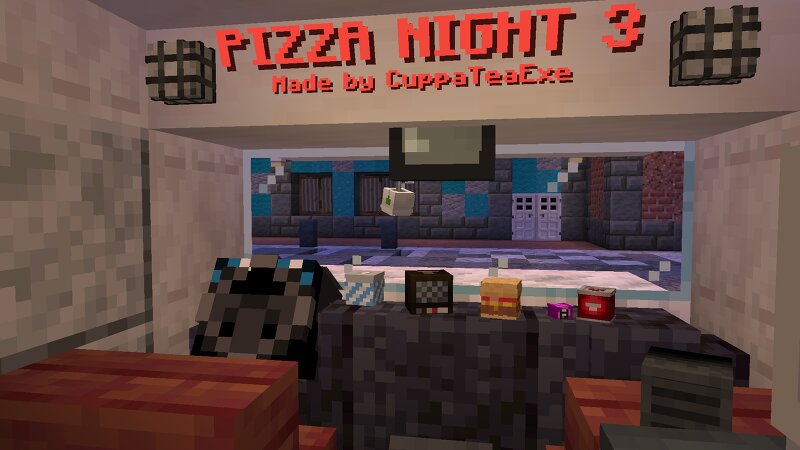
PIZZA NIGHT 3 - Five Nights at Freddy's fan game (1.21.10)
Creator: CuppaTeaExe · 2026-09-06 · Maps · Free on Eaglercraft Studio
Download PIZZA NIGHT 3 - Five Nights at Freddy's fan game (1.21.10) — free Minecraft map. Created by CuppaTeaExe. Tagged animatronics, bonnie, chica, complex. Get the world/schematic file when available and explore more free maps on Eaglercraft Studio.
Creator notes
The Final Night An anonymous tip has alerted you of an upcoming Fazbear project relating to upgraded animatronic technology. A shipment is scheduled for tomorrow morning at the production facility in the center of town. You already have an Endoskeleton. All you need now is the program. PIZZA NIGHT 3 features original gameplay based on the Five Nights at Freddy's games. Use the limited resources at your disposal to survive against a warehouse filled with robotic threats. A full breakdown of how this map was made can be found here , as well as a complete playthrough of the night. If you're using this map for your own content, be sure to link the original video in the description! Also checkout PIZZA NIGHT and PIZZA NIGHT 2 MADE FOR 1.21.10 Resource pack included in world file Download will be made available soon!
Added value
What’s included on this page
Preview, categories, compatibility, and tools on this page — not a bare file mirror.
- Creator
- CuppaTeaExe
- Source
- Minecraft downloads library on Eaglercraft Studio
- Type
- Minecraft map / world
- Price
- Free download on Eaglercraft Studio
- Curation
- Listed with credit to CuppaTeaExe · studio preview & install guide
- Compatible with
- Minecraft Java (match version / loader in facts)
- Tags
- Animatronics, Bonnie, Chica, Complex, Cuppateaexe, Cuppateaexefnaf
Install guide
How to install this free Minecraft map
Eaglercraft Studio map listing with preview, creator credit, and install steps for Java worlds.
- 1Download the world archive (.zip / .mcworld / schematic) when available.
- 2For Java: extract into your .minecraft/saves folder (or import via your launcher).
- 3Launch Minecraft, select the world, and play. Keep a backup before overwriting saves.
Check any version notes in the facts panel — maps often target a specific Minecraft release.
Related free maps
More curated maps from the same library section.

CraftyFoxe · 761 diamonds · 418 views

CraftyFoxe · 761 diamonds · 339 views

CraftyFoxe · 761 diamonds · 319 views

CraftyFoxe · 761 diamonds · 306 views