
Porsche 911 GT1 Straßenversion (1997)
Creator: Kkai · 2026-09-30 · Maps · Free on Eaglercraft Studio
Download Porsche 911 GT1 Straßenversion (1997) — free Minecraft map. Created by Kkai. Tagged land structure. Get the world/schematic file when available and explore more free maps on Eaglercraft Studio.
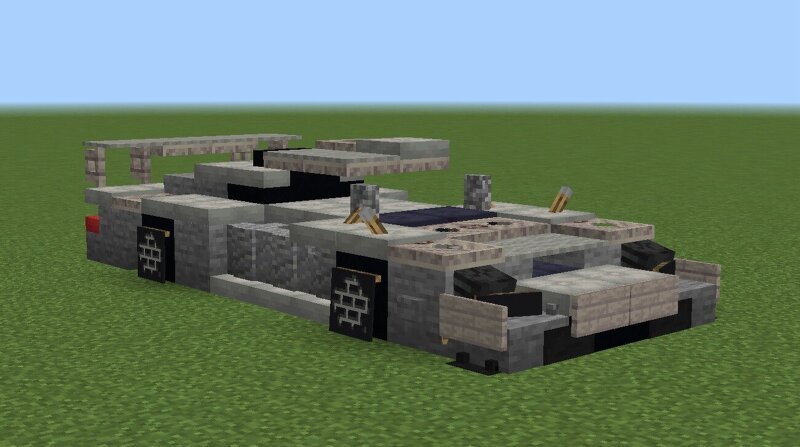
Creator notes
The Porsche 911 GT1 is a car designed and developed by German automobile manufacturer Porsche AG to compete in the GT1 class of sportscar racing, which also required a street-legal version for homologation purposes. The limited-production street-legal version developed as a result was named the 911 GT1 Straßenversion ( Street version). Towards the end of the 1996 season, Porsche made revisions to the 911 GT1 in preparation for the 1997 season. The front end of the car was revised including new bodywork which featured headlamps that previewed the all-new generation of the (996) Porsche 911 which would be unveiled in 1997. The revised car was known as the 911 GT1 Evo (or Evolution). The car had the same engine as the 1996 version, but its new aerodynamic elements allowed the 1997 version to be considerably faster than the 1996 version with improved acceleration, the top speed was still around 330km/h (205mph) on the La Sarthe Circuit (in the race, the GT1 Evo attained a top speed of 326km/h). At Le Mans the works cars led the race but did not last the full distance; a privately entered 1996 specification GT1 managed 5th overall and third in the GT1 class
Added value
What’s included on this page
Preview, categories, compatibility, and tools on this page — not a bare file mirror.
- Creator
- Kkai
- Source
- Minecraft downloads library on Eaglercraft Studio
- Type
- Minecraft map / world
- Price
- Free download on Eaglercraft Studio
- Curation
- Listed with credit to Kkai · studio preview & install guide
- Compatible with
- Minecraft Java (match version / loader in facts)
- Tags
- Land Structure
Install guide
How to install this free Minecraft map
Eaglercraft Studio map listing with preview, creator credit, and install steps for Java worlds.
- 1Download the world archive (.zip / .mcworld / schematic) when available.
- 2For Java: extract into your .minecraft/saves folder (or import via your launcher).
- 3Launch Minecraft, select the world, and play. Keep a backup before overwriting saves.
Check any version notes in the facts panel — maps often target a specific Minecraft release.
Related free maps
More curated maps from the same library section.

CraftyFoxe · 761 diamonds · 418 views

CraftyFoxe · 761 diamonds · 339 views

CraftyFoxe · 761 diamonds · 319 views

CraftyFoxe · 761 diamonds · 306 views