
Project - The Hub
Creator: EuphoriaLuna · 2026-09-30 · Maps · Free on Eaglercraft Studio
Download Project - The Hub — free Minecraft map. Created by EuphoriaLuna. Tagged backrooms, backroomshiddenlevel, backroomslevel, complex. Get the world/schematic file when available and explore more free maps on Eaglercraft Studio.
Creator notes
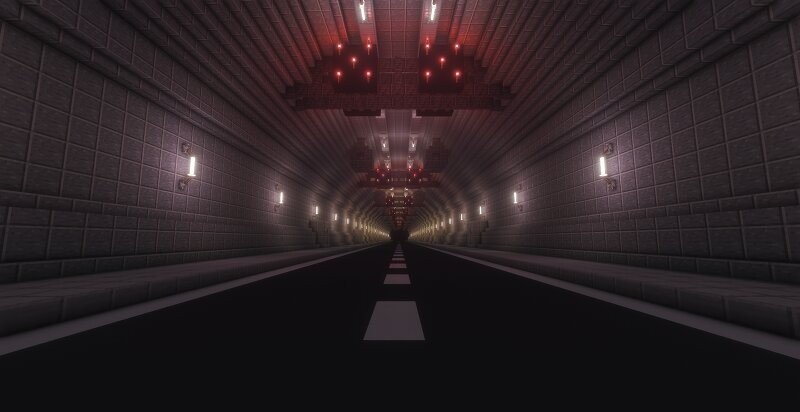
This is the Hub.The Hub consists of a vast underground tunnel complex and is a hidden level that serves as a central hub for the entire Backrooms, providing access to every individual level. (My version of the Hub consists of only one tunnel). The Hub is completely safe; it's devoid of entities . The Hub is part of Liminal Spaces. I created the Hub with photo's from the internet. If you would like more information about the Hub, please visit these sites: https://backrooms.fandom.com/wiki/The_Hub https://backrooms-wiki.wikidot.com/the-hub Minecraft map version: 26.2 I used worldedit to build the Hub. Shader Pack: Solas Shader by Septonious .
Added value
What’s included on this page
Preview, categories, compatibility, and tools on this page — not a bare file mirror.
- Creator
- EuphoriaLuna
- Source
- Minecraft downloads library on Eaglercraft Studio
- Type
- Minecraft map / world
- Price
- Free download on Eaglercraft Studio
- Curation
- Listed with credit to EuphoriaLuna · studio preview & install guide
- Compatible with
- Minecraft Java (match version / loader in facts)
- Tags
- Backrooms, Backroomshiddenlevel, Backroomslevel, Complex, Euphorialuna, Hidden Level
Install guide
How to install this free Minecraft map
Eaglercraft Studio map listing with preview, creator credit, and install steps for Java worlds.
- 1Download the world archive (.zip / .mcworld / schematic) when available.
- 2For Java: extract into your .minecraft/saves folder (or import via your launcher).
- 3Launch Minecraft, select the world, and play. Keep a backup before overwriting saves.
Check any version notes in the facts panel — maps often target a specific Minecraft release.
Related free maps
More curated maps from the same library section.

CraftyFoxe · 761 diamonds · 418 views

CraftyFoxe · 761 diamonds · 339 views

CraftyFoxe · 761 diamonds · 319 views

CraftyFoxe · 761 diamonds · 306 views