
reBlock City: Battle Royale Season 4
Creator: soyalans · 2026-09-09 · Maps · Free on Eaglercraft Studio
Download reBlock City: Battle Royale Season 4 — free Minecraft map. Created by soyalans. Tagged other. Get the world/schematic file when available and explore more free maps on Eaglercraft Studio.
Creator notes
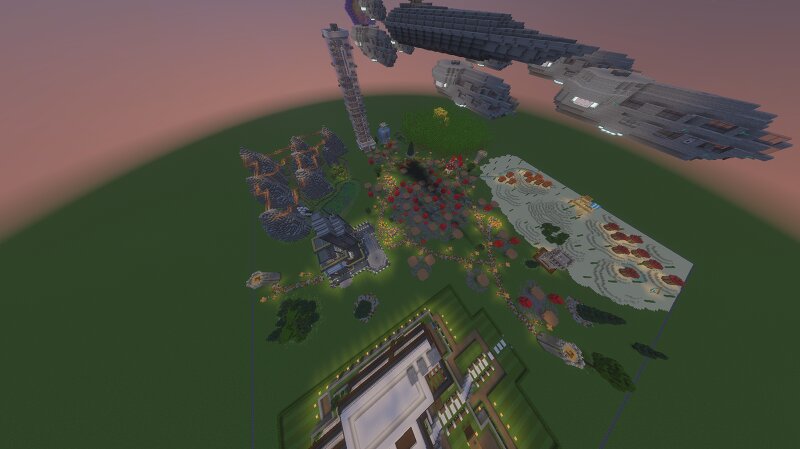
English Step into Season 4 of this action-packed 300x300x100 battle royale map built for fast-paced, fun, and replayable matches! Players spawn high above the arena at (150, 100, -150) and slowly drop, choosing their landing spot wisely. Scattered across the map are randomized loot chests, making every game feel fresh and unpredictable as a deadly moving storm forces players into combat. The Story & New Features in Season 4: The interdimensional fungal infection has been spreading since Season 2, and the medieval knights who arrived in Season 3 couldn't stop it. Now in Season 4, the multiversal organization Ortex has finally arrived with their futuristic outpost and high-tech gear to contain the threat once and for all! -> Enhanced Weapons & Tech: Ortex has upgraded standard vanilla gear—like iron and diamond swords and modified the medieval weapons found around the map with powerful custom enchantments. -> Plasma Cannon: Master a devastating heavy weapon that shoots destructive plasma (limited to 3 uses). -> Locked Armors: Discover 2 mystery armor sets hidden in the map, currently locked for future phases. -> Themed Zones: Explore diverse biomes including the Bamboo Forest, Desert
Added value
What’s included on this page
Preview, categories, compatibility, and tools on this page — not a bare file mirror.
- Creator
- soyalans
- Source
- Minecraft downloads library on Eaglercraft Studio
- Type
- Minecraft map / world
- Price
- Free download on Eaglercraft Studio
- Curation
- Listed with credit to soyalans · studio preview & install guide
- Compatible with
- Minecraft Java (match version / loader in facts)
- Tags
- Other
Install guide
How to install this free Minecraft map
Eaglercraft Studio map listing with preview, creator credit, and install steps for Java worlds.
- 1Download the world archive (.zip / .mcworld / schematic) when available.
- 2For Java: extract into your .minecraft/saves folder (or import via your launcher).
- 3Launch Minecraft, select the world, and play. Keep a backup before overwriting saves.
Check any version notes in the facts panel — maps often target a specific Minecraft release.
Related free maps
More curated maps from the same library section.

CraftyFoxe · 761 diamonds · 418 views

CraftyFoxe · 761 diamonds · 339 views

CraftyFoxe · 761 diamonds · 319 views

CraftyFoxe · 761 diamonds · 306 views