
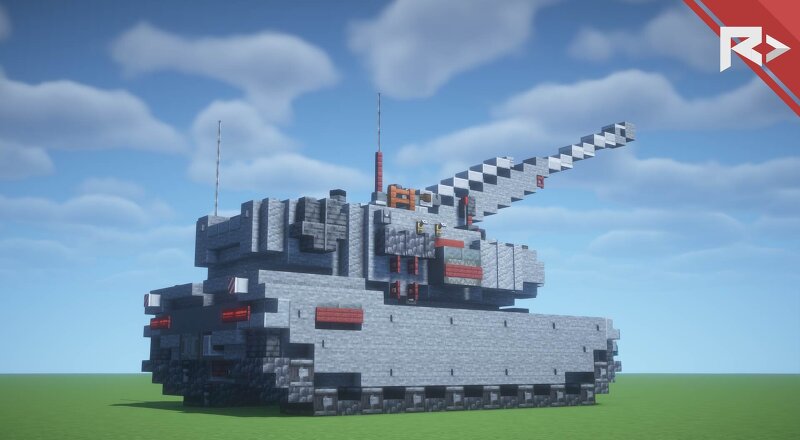
REICHMETALL // Pz. T-Class BASILISK H4a // 26.1.2
Creator: REICHMETALL · 2026-08-30 · Maps · Free on Eaglercraft Studio
Download REICHMETALL // Pz. T-Class BASILISK H4a // 26.1.2 — free Minecraft map. Created by REICHMETALL. Tagged armored, army, artillery, battle. Get the world/schematic file when available and explore more free maps on Eaglercraft Studio.
Creator notes
# **Pz. T-Class Basilisk H4a** ### Heavy Self-Propelled Artillery System The **Pz. T-Class Basilisk H4a** is Reichmetall's next-generation self-propelled artillery platform, designed to deliver rapid and precise long-range fire support. Combining a high-performance automated artillery system with advanced digital fire control, the Basilisk H4a enables crews to engage targets within seconds. Fully integrated into the **Reichmetall Tactical Network (RTN)**, the vehicle can receive target coordinates directly from reconnaissance drones, forward observers, infantry units, or command centers. Using AI-assisted ballistic calculations, the fire control system automatically determines the optimal firing solution, allowing operators to designate a target with only a few inputs before the system executes the strike. The Basilisk H4a is optimized for fast deployment, rapid fire missions, and immediate relocation after firing, making it highly effective against enemy fortifications, armored formations, logistics hubs, and other high-value targets while minimizing exposure to counter-battery fire. Its simple operation, automated targeting systems, and seamless battlefield connectivity make the
Added value
What’s included on this page
Preview, categories, compatibility, and tools on this page — not a bare file mirror.
- Creator
- REICHMETALL
- Source
- Minecraft downloads library on Eaglercraft Studio
- Type
- Minecraft map / world
- Price
- Free download on Eaglercraft Studio
- Curation
- Listed with credit to REICHMETALL · studio preview & install guide
- Compatible with
- Minecraft Java (match version / loader in facts)
- Tags
- Armored, Army, Artillery, Battle, Combat, Company
Install guide
How to install this free Minecraft map
Eaglercraft Studio map listing with preview, creator credit, and install steps for Java worlds.
- 1Download the world archive (.zip / .mcworld / schematic) when available.
- 2For Java: extract into your .minecraft/saves folder (or import via your launcher).
- 3Launch Minecraft, select the world, and play. Keep a backup before overwriting saves.
Check any version notes in the facts panel — maps often target a specific Minecraft release.
Related free maps
More curated maps from the same library section.

CraftyFoxe · 761 diamonds · 418 views

CraftyFoxe · 761 diamonds · 339 views

CraftyFoxe · 761 diamonds · 319 views

CraftyFoxe · 761 diamonds · 306 views