
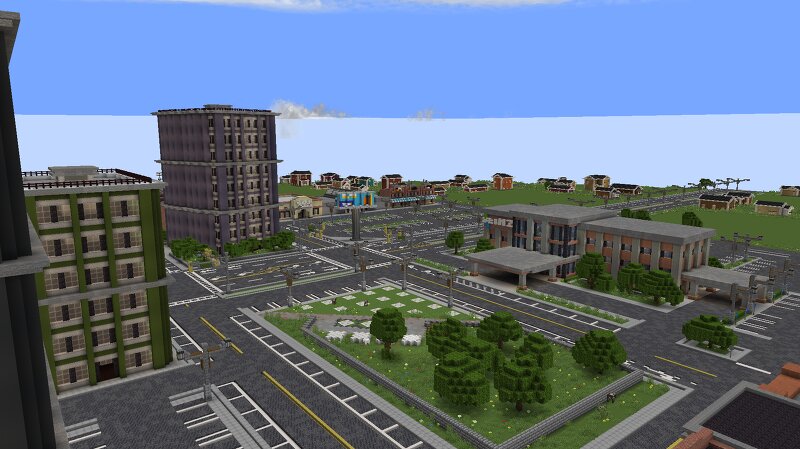
(ROBLOX) Twisted 1.22 Map Recreation DEMO
Creator: makophobia · 2026-09-25 · Maps · Free on Eaglercraft Studio
Download (ROBLOX) Twisted 1.22 Map Recreation DEMO — free Minecraft map. Created by makophobia. Tagged adventure, other, recreation, roblox. Get the world/schematic file when available and explore more free maps on Eaglercraft Studio.
Creator notes
This map will NOT run well on low-end devices! Roblox's "Twisted" is a storm chasing game by Willzuh and Siryzm. Keysota is the fictional state featured in the Roblox game, Twisted. This is a DEMO for the full map, including the northern most part of the map. Wanted to upload this after I felt a small burn out incoming, as well as a game update coming soon which refreshes the map. Wanted to get this out here before that happened in case the map update is too big for me to go back and change. This map is NOT a 1:1 recreation. It also may have some incorrect road layouts, especially near the Sneed Lake area. I apologize. This is the closest I could get the map with just my eye and hand. This is also not the finished version of the area. Things are subject to change. This map used mods and addons for an older version of Protomanly's Weather during construction. Please use the modpack given along with the map file, you can edit it from there. I do not know what happens to the map or mods if you update Protomanly's Weather to 0.14+ This map is intended for 1.21.1, Neoforge Please give me any feedback, and credit me if used in a video! www.youtube.com/@makosoreal
Added value
What’s included on this page
Preview, categories, compatibility, and tools on this page — not a bare file mirror.
- Creator
- makophobia
- Source
- Minecraft downloads library on Eaglercraft Studio
- Type
- Minecraft map / world
- Price
- Free download on Eaglercraft Studio
- Curation
- Listed with credit to makophobia · studio preview & install guide
- Compatible with
- Minecraft Java (match version / loader in facts)
- Tags
- Adventure, Other, Recreation, Roblox, Stormchasing
Install guide
How to install this free Minecraft map
Eaglercraft Studio map listing with preview, creator credit, and install steps for Java worlds.
- 1Download the world archive (.zip / .mcworld / schematic) when available.
- 2For Java: extract into your .minecraft/saves folder (or import via your launcher).
- 3Launch Minecraft, select the world, and play. Keep a backup before overwriting saves.
Check any version notes in the facts panel — maps often target a specific Minecraft release.
Related free maps
More curated maps from the same library section.

CraftyFoxe · 761 diamonds · 418 views

CraftyFoxe · 761 diamonds · 339 views

CraftyFoxe · 761 diamonds · 319 views

CraftyFoxe · 761 diamonds · 306 views