
Royal Oak 1690
Creator: Sir Edward Pellew · 2026-09-17 · Maps · Free on Eaglercraft Studio
Download Royal Oak 1690 — free Minecraft map. Created by Sir Edward Pellew. Tagged 3rdrate, adventure, battleship, hmsroyalsovereign. Get the world/schematic file when available and explore more free maps on Eaglercraft Studio.
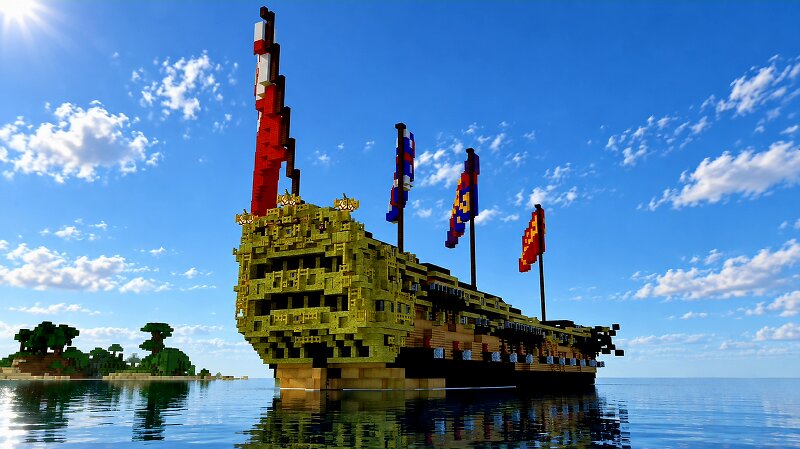
Creator notes
Launched in 1690, Royal Oak at 1,154 Tons BM was rated for 70-74 guns and 500 Men and Classed as a Third Rate Ship Of The Line. Built during a period where the Royal Navy was beginning to seek options to counter the ever increasing size of French Third Rate ships, which were starting to outclass English standard 150' 70 gunners, The old Royal Oak launched in 1674, was well regarded in the fleet as likely one of the best sailors of the 3rd Rate class, originally designed by Jonas Shish she was state of the art. But by the late 1680s, Royal Oak started to look alot more appealing not only for her speed, but her extra size, Royal Oak was 7' longer than normal British 70s, this is partly what gifted her the speed she was famous for but, it also allowed for an armament to counter the newer French Threat. Thus in 1690, Sir Robert Lee a renowned naval designer of his time, set about Rebuilding and modernizing the ageing Royal Oak. The process called ''Rebuilding'' began, Lee added new headrails and two new stern balconies' more in fashion at the time, opposed to the one row of stern lights that once resided there. He modernised her internals bringing her capacity for crew and fighting equ
Added value
What’s included on this page
Preview, categories, compatibility, and tools on this page — not a bare file mirror.
- Creator
- Sir Edward Pellew
- Source
- Minecraft downloads library on Eaglercraft Studio
- Type
- Minecraft map / world
- Price
- Free download on Eaglercraft Studio
- Curation
- Listed with credit to Sir Edward Pellew · studio preview & install guide
- Compatible with
- Minecraft Java (match version / loader in facts)
- Tags
- 3rdrate, Adventure, Battleship, Hmsroyalsovereign, Hmsvanguard, Hmsvictory
Install guide
How to install this free Minecraft map
Eaglercraft Studio map listing with preview, creator credit, and install steps for Java worlds.
- 1Download the world archive (.zip / .mcworld / schematic) when available.
- 2For Java: extract into your .minecraft/saves folder (or import via your launcher).
- 3Launch Minecraft, select the world, and play. Keep a backup before overwriting saves.
Check any version notes in the facts panel — maps often target a specific Minecraft release.
Related free maps
More curated maps from the same library section.

CraftyFoxe · 761 diamonds · 418 views

CraftyFoxe · 761 diamonds · 339 views

CraftyFoxe · 761 diamonds · 319 views

CraftyFoxe · 761 diamonds · 306 views