
Shiomi (潮見) - Japanese Castle Town
Creator: FikiAndBiki · 2026-09-24 · Maps · Free on Eaglercraft Studio
Download Shiomi (潮見) - Japanese Castle Town — free Minecraft map. Created by FikiAndBiki. Tagged land structure. Get the world/schematic file when available and explore more free maps on Eaglercraft Studio.
Creator notes
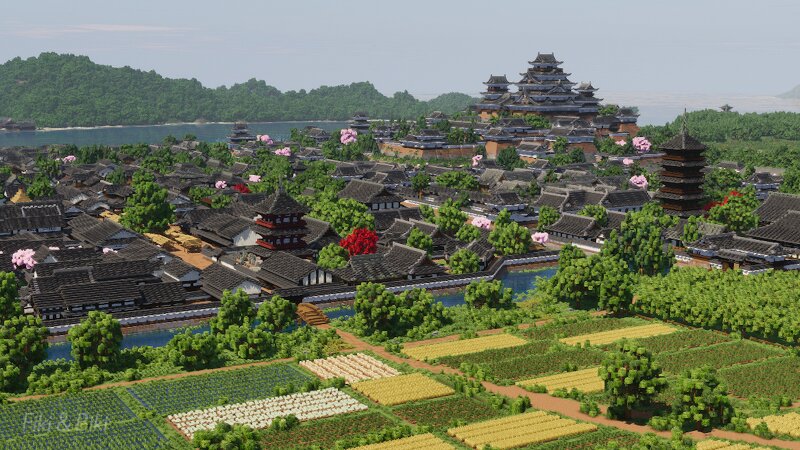
We started this project in August of 2024, and now, two years and more than 1,500 hours later, our original vision is mostly complete! Our community recently voted to name the town Shiomi (潮見). The project was inspired by too many places to list, but especially Himeji, Matsumoto, Hagi, Osaka, and Kyoto. It began as just a large Japanese castle complex seen here: www.planetminecraft.com/project/black-heron-castle/ , but we didn't want to build another castle surrounded by nothing but forest. The idea grew into a full castle town containing around 400 buildings. The town has gone through countless iterations, with entire landscapes and sections being built, rebuilt, and reworked along the way. We plan to continue developing Shiomi by completing the gardens, adding more roadside detail and street life, rebuilding the oldest samurai district buildings, expanding the town into the surrounding farmland, creating farming villages, and much more. 99% of the buildings don't have interiors, but maybe we'll do a few more.
Added value
What’s included on this page
Preview, categories, compatibility, and tools on this page — not a bare file mirror.
- Creator
- FikiAndBiki
- Source
- Minecraft downloads library on Eaglercraft Studio
- Type
- Minecraft map / world
- Price
- Free download on Eaglercraft Studio
- Curation
- Listed with credit to FikiAndBiki · studio preview & install guide
- Compatible with
- Minecraft Java (match version / loader in facts)
- Tags
- Land Structure
Install guide
How to install this free Minecraft map
Eaglercraft Studio map listing with preview, creator credit, and install steps for Java worlds.
- 1Download the world archive (.zip / .mcworld / schematic) when available.
- 2For Java: extract into your .minecraft/saves folder (or import via your launcher).
- 3Launch Minecraft, select the world, and play. Keep a backup before overwriting saves.
Check any version notes in the facts panel — maps often target a specific Minecraft release.
Related free maps
More curated maps from the same library section.

CraftyFoxe · 761 diamonds · 418 views

CraftyFoxe · 761 diamonds · 339 views

CraftyFoxe · 761 diamonds · 319 views

CraftyFoxe · 761 diamonds · 306 views