
⛓️ Siberian Outpost: Sector Black
Creator: Kowal_96 · 2026-09-12 · Maps · Free on Eaglercraft Studio
Download ⛓️ Siberian Outpost: Sector Black — free Minecraft map. Created by Kowal_96. Tagged brutalist, bunker, camp, forest. Get the world/schematic file when available and explore more free maps on Eaglercraft Studio.
Creator notes
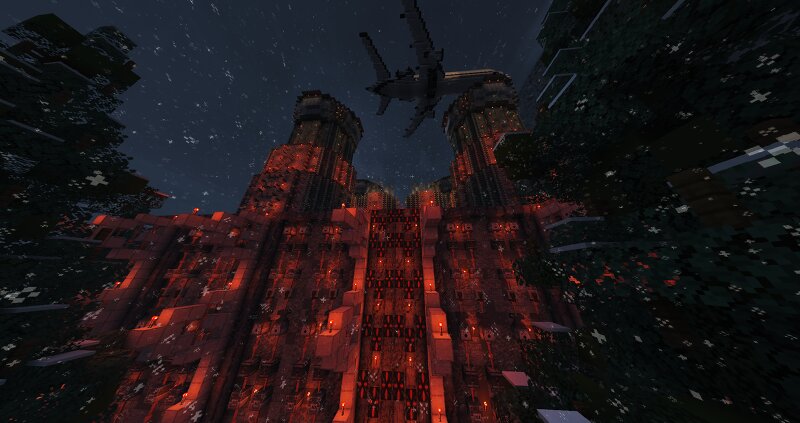
👋 Hello everyone, I am sharing my 15th project on this platform: Siberian Outpost: Sector Black. This map is a compact, atmospheric build set in a frozen, remote forest. The main focus of this project was to create a dark, hidden government facility designed for high-security detention, interrogations, and harsh containment. 🌲 The centerpiece of the map is the heavily fortified outpost, hidden away in a winter landscape. The structure features twin brutalist watchtowers, massive security gates, and a tightly packed facility layout surrounded by dense forest. A low-flying transport plane overhead locks in the tense, isolated atmosphere. ⛓️ The architecture relies on cold, industrial geometry and a stark color palette to bring this grim facility to life. Built specifically as a focused, small-scale showcase, the exterior and layout are designed to feel oppressive, secluded, and highly secure from any outside intervention. 🎭 As a builder, my priority was creating a highly specialized setting for hardcore server roleplay (RP). Since the map is intentionally smaller and layout-focused without custom automated mechanics, it serves as a perfect open canvas—you can easily integrate it as a
Added value
What’s included on this page
Preview, categories, compatibility, and tools on this page — not a bare file mirror.
- Creator
- Kowal_96
- Source
- Minecraft downloads library on Eaglercraft Studio
- Type
- Minecraft map / world
- Price
- Free download on Eaglercraft Studio
- Curation
- Listed with credit to Kowal_96 · studio preview & install guide
- Compatible with
- Minecraft Java (match version / loader in facts)
- Tags
- Brutalist, Bunker, Camp, Forest, Interrogation, Kowal 96
Install guide
How to install this free Minecraft map
Eaglercraft Studio map listing with preview, creator credit, and install steps for Java worlds.
- 1Download the world archive (.zip / .mcworld / schematic) when available.
- 2For Java: extract into your .minecraft/saves folder (or import via your launcher).
- 3Launch Minecraft, select the world, and play. Keep a backup before overwriting saves.
Check any version notes in the facts panel — maps often target a specific Minecraft release.
Related free maps
More curated maps from the same library section.

CraftyFoxe · 761 diamonds · 418 views

CraftyFoxe · 761 diamonds · 339 views

CraftyFoxe · 761 diamonds · 319 views

CraftyFoxe · 761 diamonds · 306 views