
Small Cottage Bookshop
Creator: DiegoKaterson · 2026-09-14 · Maps · Free on Eaglercraft Studio
Download Small Cottage Bookshop — free Minecraft map. Created by DiegoKaterson. Tagged book, books, bookshop, bookstore. Get the world/schematic file when available and explore more free maps on Eaglercraft Studio.
Creator notes
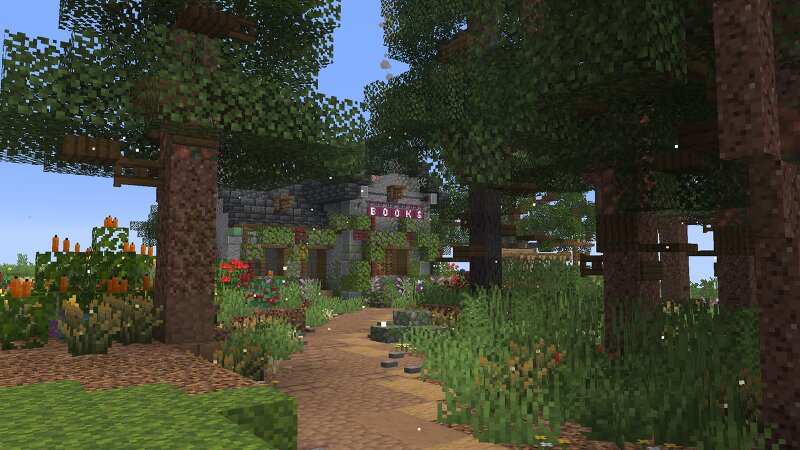
🌲 The Little Cottage Bookshop 📚 A small, cozy cottage hidden somewhere between cedar trees, pine forests and overgrown meadows. This little bookshop was originally planned as a larger diorama, but somewhere along the way I lost the motivation to finish the entire project. Instead of letting the finished parts disappear into my folders forever, I decided to share the roughly 80% completed section of the build with the community. The cottage itself is a small fantasy-inspired bookshop . On the ground floor you'll find a little counter and several bookshelves, while the upper floor contains a cozy reading area and a tiny private room for the shopkeeper — a quiet place to retreat after a long day. Outside, the cottage is surrounded by nature. Several flower and vegetable beds, little benches and winding paths make the area feel lived-in, while a forest of hand-built cedar and pine trees completely surrounds the house. Behind the cottage stands a single enormous old oak tree, overlooking a large meadow with a little swing beneath its branches. 🌳 One of my favorite aspects of this build is the nature itself . Every tree was built by hand using Axiom , rather than relying on world-generat
Added value
What’s included on this page
Preview, categories, compatibility, and tools on this page — not a bare file mirror.
- Creator
- DiegoKaterson
- Source
- Minecraft downloads library on Eaglercraft Studio
- Type
- Minecraft map / world
- Price
- Free download on Eaglercraft Studio
- Curation
- Listed with credit to DiegoKaterson · studio preview & install guide
- Compatible with
- Minecraft Java (match version / loader in facts)
- Tags
- Book, Books, Bookshop, Bookstore, British, Calm
Install guide
How to install this free Minecraft map
Eaglercraft Studio map listing with preview, creator credit, and install steps for Java worlds.
- 1Download the world archive (.zip / .mcworld / schematic) when available.
- 2For Java: extract into your .minecraft/saves folder (or import via your launcher).
- 3Launch Minecraft, select the world, and play. Keep a backup before overwriting saves.
Check any version notes in the facts panel — maps often target a specific Minecraft release.
Related free maps
More curated maps from the same library section.

CraftyFoxe · 761 diamonds · 418 views

CraftyFoxe · 761 diamonds · 339 views

CraftyFoxe · 761 diamonds · 319 views

CraftyFoxe · 761 diamonds · 306 views