
Soviet House series 1-201-18/ЦБСП № 6389
Creator: Lisovis · 2026-08-30 · Maps · Free on Eaglercraft Studio
Download Soviet House series 1-201-18/ЦБСП № 6389 — free Minecraft map. Created by Lisovis. Tagged apartmentbuilding, brezhnevka, khrushchevka, other. Get the world/schematic file when available and explore more free maps on Eaglercraft Studio.
Creator notes
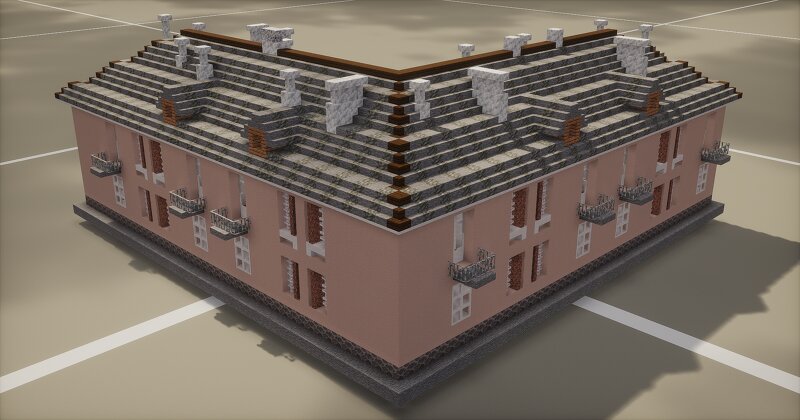
This is a Soviet standard project 1-201-18 , which is part of the well‑known post‑war series of residential buildings designed by architect S. A. Maslikh. Technical specifications Project 1-201-18 is a 2‑storey, 16‑apartment brick corner residential building . In some regions, for example, in Murmansk, its number of storeys could be increased to three when adapting it to the local terrain. Apartments : a total of 16 apartments . The project includes one‑room, two‑room, and three‑room apartments. Areas : Total volume of the building: 3,829.8 m³ . Residential area of the house: With stove heating: 480.86 m² . With central heating: 494.14 m² . Ceiling height : 2.82 metres (clean). Structures : Load‑bearing walls are made of brick . Apartment layouts : One‑room apartments: 20–22 m² (4 sq.) and 27–28 m² (2 sq.). Two‑room apartments: 29–30 m² (4 sq.). Three‑room apartments: 37–39 m² (6 sq.). Configuration options The project, like many others in the series, had two key execution options: By type of heating : Houses could be built with stove or central heating. Pre‑reform and post‑reform (from 1950) : Original project (before 1950) was distinguished by a richer architectural decoration. I
Added value
What’s included on this page
Preview, categories, compatibility, and tools on this page — not a bare file mirror.
- Creator
- Lisovis
- Source
- Minecraft downloads library on Eaglercraft Studio
- Type
- Minecraft map / world
- Price
- Free download on Eaglercraft Studio
- Curation
- Listed with credit to Lisovis · studio preview & install guide
- Compatible with
- Minecraft Java (match version / loader in facts)
- Tags
- Apartmentbuilding, Brezhnevka, Khrushchevka, Other, Panelka, Soviet
Install guide
How to install this free Minecraft map
Eaglercraft Studio map listing with preview, creator credit, and install steps for Java worlds.
- 1Download the world archive (.zip / .mcworld / schematic) when available.
- 2For Java: extract into your .minecraft/saves folder (or import via your launcher).
- 3Launch Minecraft, select the world, and play. Keep a backup before overwriting saves.
Check any version notes in the facts panel — maps often target a specific Minecraft release.
Related free maps
More curated maps from the same library section.

CraftyFoxe · 761 diamonds · 418 views

CraftyFoxe · 761 diamonds · 339 views

CraftyFoxe · 761 diamonds · 319 views

CraftyFoxe · 761 diamonds · 306 views