
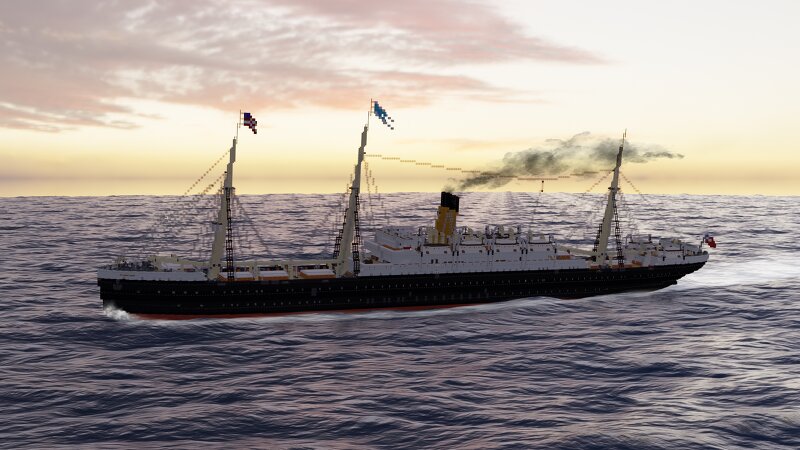
SS Amerium 1899 a Combi-Liner (Java+Bedrock download)
Creator: Defcatra · 2026-09-12 · Maps · Free on Eaglercraft Studio
Download SS Amerium 1899 a Combi-Liner (Java+Bedrock download) — free Minecraft map. Created by Defcatra. Tagged 1800s, 1900s, amerium, ast. Get the world/schematic file when available and explore more free maps on Eaglercraft Studio.
Creator notes
Credits: Big thanks for the Render: NAD Shipyard ( www.planetminecraft.com/member/nad_shipyard/ ) Also big thanks to https://www.planetminecraft.com/member/dominion_enterprises/ for helping me with 3rd and 2nd Class planning and building History: The S.S. Amerium (Yard number 214) was build alongside her sister the S.S Europium (Yard number 215) as an replacement for the sunken Alexandrium(1898). Originally Amerium was planned as a single class ship but soon after the Alexandrium disaster another keel based on her plans was layed down which was then called Europium. The company decided that two smaller ships with more cargo capacity can replace Alexandrium better than just building another ship of the Alexandrium class. right after her Maiden Voyage Europium served as a Troopcarrier in the second Boer-War. Ameriums carrer was uneventful apart from having a near collision with another AST steamer the Scotium in 1904 . They served together till 1916 when Amerium was sunk by an Torpedo Europium was scrapped in 1930. General Info: Length 152m Width: 16m Speed 16knots Machinery: 4 double ended boilers 2 Triple expansion steam engines Crew: 185 1st Class:111 2nd Class:102 3rd Class:416 L
Added value
What’s included on this page
Preview, categories, compatibility, and tools on this page — not a bare file mirror.
- Creator
- Defcatra
- Source
- Minecraft downloads library on Eaglercraft Studio
- Type
- Minecraft map / world
- Price
- Free download on Eaglercraft Studio
- Curation
- Listed with credit to Defcatra · studio preview & install guide
- Compatible with
- Minecraft Java (match version / loader in facts)
- Tags
- 1800s, 1900s, Amerium, Ast, Atlantik, Atlantikstarline
Install guide
How to install this free Minecraft map
Eaglercraft Studio map listing with preview, creator credit, and install steps for Java worlds.
- 1Download the world archive (.zip / .mcworld / schematic) when available.
- 2For Java: extract into your .minecraft/saves folder (or import via your launcher).
- 3Launch Minecraft, select the world, and play. Keep a backup before overwriting saves.
Check any version notes in the facts panel — maps often target a specific Minecraft release.
Related free maps
More curated maps from the same library section.

CraftyFoxe · 761 diamonds · 418 views

CraftyFoxe · 761 diamonds · 339 views

CraftyFoxe · 761 diamonds · 319 views

CraftyFoxe · 761 diamonds · 306 views