
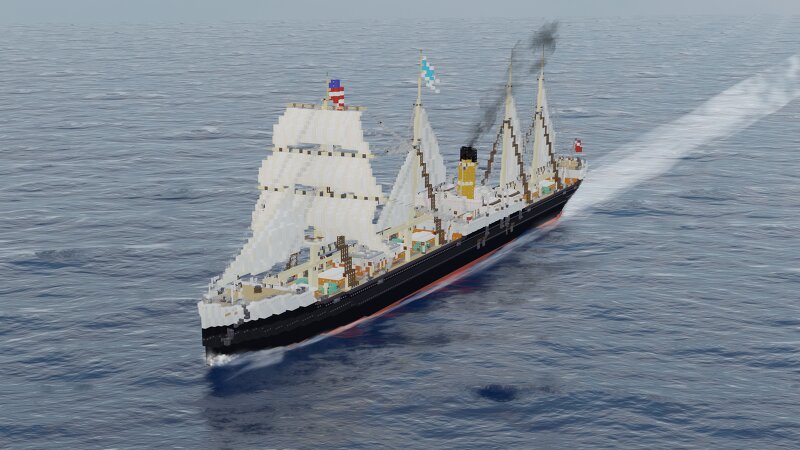
SS Equium 1888 a livestock carrier (Java+Bedrock)
Creator: Defcatra · 2026-09-11 · Maps · Free on Eaglercraft Studio
Download SS Equium 1888 a livestock carrier (Java+Bedrock) — free Minecraft map. Created by Defcatra. Tagged 1800s, 1900s, ast, atlanikstarline. Get the world/schematic file when available and explore more free maps on Eaglercraft Studio.
Creator notes
Credits: Big thanks for the Render: NAD Shipyard ( www.planetminecraft.com/member/nad_shipyard/ ) The S.S. Equium was built in 1888 alongside her sister the Pecurium both where planned and build as livestock carriers to serve the Northatlantik route. Equium was sold in 1905 to a german company she was scrapped in 1923. Pecurium was sunk in 1916 by an torpedo General Info: Length 135m Width: 14m Speed 12.5knots Machinery: 6 Single ended boilers 1 Triple expansion steam engines Crew: 77 Cabin Passengers: 8 Lemme know what you think of her! Building scale 1m=>1.8 blocks For more info feel free to message me on Discord user:defcatra or just join my discord link down below (This ship is purely fictional/ I herefore have all the rights for this vessel) (Please dont change anything you see on this ship and distribute these changes without me being notified) My Discordserver (always looking for fellow builders) : [url= discord.gg/F89xFvXDHM ] discord.gg/F89xFvXDHM [/url] Update History
Added value
What’s included on this page
Preview, categories, compatibility, and tools on this page — not a bare file mirror.
- Creator
- Defcatra
- Source
- Minecraft downloads library on Eaglercraft Studio
- Type
- Minecraft map / world
- Price
- Free download on Eaglercraft Studio
- Curation
- Listed with credit to Defcatra · studio preview & install guide
- Compatible with
- Minecraft Java (match version / loader in facts)
- Tags
- 1800s, 1900s, Ast, Atlanikstarline, Atlantik, Bedrock
Install guide
How to install this free Minecraft map
Eaglercraft Studio map listing with preview, creator credit, and install steps for Java worlds.
- 1Download the world archive (.zip / .mcworld / schematic) when available.
- 2For Java: extract into your .minecraft/saves folder (or import via your launcher).
- 3Launch Minecraft, select the world, and play. Keep a backup before overwriting saves.
Check any version notes in the facts panel — maps often target a specific Minecraft release.
Related free maps
More curated maps from the same library section.

CraftyFoxe · 761 diamonds · 418 views

CraftyFoxe · 761 diamonds · 339 views

CraftyFoxe · 761 diamonds · 319 views

CraftyFoxe · 761 diamonds · 306 views