
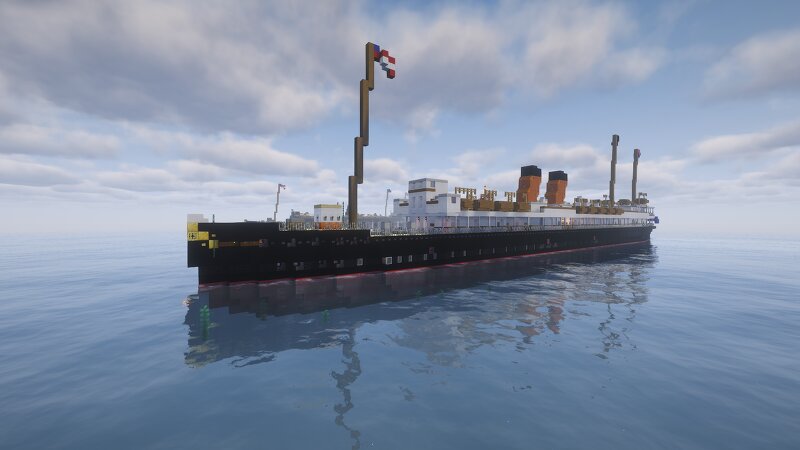
SS Mediterranean 1890
Creator: TheDestroyr1912 · 2026-09-20 · Maps · Free on Eaglercraft Studio
Download SS Mediterranean 1890 — free Minecraft map. Created by TheDestroyr1912. Tagged other, water structure. Get the world/schematic file when available and explore more free maps on Eaglercraft Studio.
Creator notes
SS MEDITERRANEAN 1890 Download will come without biomes and terrain This is a fictional ship called the SS Mediterranean operated by the Liverpool transatlantic Steam Line, and launched in January 1890. In April 1890, The SS Mediterranean steamed on its first voyage from Liverpool to New York, continuing to do until it was temporarily fitted for repairs in 1900, after running aground. After the sinking of the Titanic, It was fitted with extra lifeboats, along with a refit which saw better passenger spaces, and more improvements. In august 1914, the SS Mediterranean was initially called for Armed Auxiliary Cruiser service, but converted to a hospital ship in 1915, which could never be finished, as mid-transfer to a hospital ship, it was converted to a troop ship in 1916. In March 1917, The HMT Mediterranean struck a mine of the coast of the Netherlands, and sank in 25 minutes. It was a return voyage after deploying troops, and was meant to be converted back into an ocean-liner when it arrived back in Liverpool, although it never made it, with 58 crew on board and 0 casualties. It uses a 4-stroke combustion engine, and the 10th largest ship in the world at that time.. There will be a
Added value
What’s included on this page
Preview, categories, compatibility, and tools on this page — not a bare file mirror.
- Creator
- TheDestroyr1912
- Source
- Minecraft downloads library on Eaglercraft Studio
- Type
- Minecraft map / world
- Price
- Free download on Eaglercraft Studio
- Curation
- Listed with credit to TheDestroyr1912 · studio preview & install guide
- Compatible with
- Minecraft Java (match version / loader in facts)
- Tags
- Other, Water Structure
Install guide
How to install this free Minecraft map
Eaglercraft Studio map listing with preview, creator credit, and install steps for Java worlds.
- 1Download the world archive (.zip / .mcworld / schematic) when available.
- 2For Java: extract into your .minecraft/saves folder (or import via your launcher).
- 3Launch Minecraft, select the world, and play. Keep a backup before overwriting saves.
Check any version notes in the facts panel — maps often target a specific Minecraft release.
Related free maps
More curated maps from the same library section.

CraftyFoxe · 761 diamonds · 418 views

CraftyFoxe · 761 diamonds · 339 views

CraftyFoxe · 761 diamonds · 319 views

CraftyFoxe · 761 diamonds · 306 views