
St. Patrick's Cathedral (New York City) | Roaring 20's
Creator: Roaring20s · 2026-09-01 · Maps · Free on Eaglercraft Studio
Download St. Patrick's Cathedral (New York City) | Roaring 20's — free Minecraft map. Created by Roaring20s. Tagged 1920s, 1930s, 20s, 30s. Get the world/schematic file when available and explore more free maps on Eaglercraft Studio.
Creator notes
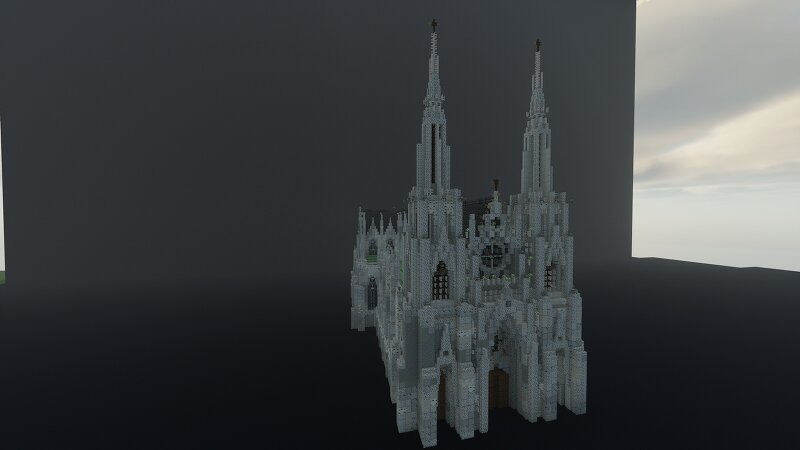
St. Patrick’s Cathedral is one of the most famous and important churches in New York City. It is located on Fifth Avenue in Midtown Manhattan , directly across from Rockefeller Center. The cathedral was built between 1858 and 1878 and was designed by architect James Renwick Jr. in the Gothic Revival style. It is made of white marble and is known for its impressive twin spires, large stained-glass windows, and beautiful interior . St. Patrick’s Cathedral is the seat of the Archbishop of New York and remains an important place of worship and a popular tourist attraction today. Roaring Twenties – A 1920s Mafia Roleplay Experience Step into the gritty streets of a 1920s-inspired city, where the law is weak and the Mafia rules. Run illegal alcohol businesses, collect protection money, and rise through the criminal ranks. Realistic roleplay, custom vehicles, dynamic NPCs, and immersive dialogue systems await you. No building – just pure atmosphere, crime, and story. 🚧 Server Still in Development – Stay Tuned for Updates! 🚧 Wikipedia Discord
Added value
What’s included on this page
Preview, categories, compatibility, and tools on this page — not a bare file mirror.
- Creator
- Roaring20s
- Source
- Minecraft downloads library on Eaglercraft Studio
- Type
- Minecraft map / world
- Price
- Free download on Eaglercraft Studio
- Curation
- Listed with credit to Roaring20s · studio preview & install guide
- Compatible with
- Minecraft Java (match version / loader in facts)
- Tags
- 1920s, 1930s, 20s, 30s, Building, Church
Install guide
How to install this free Minecraft map
Eaglercraft Studio map listing with preview, creator credit, and install steps for Java worlds.
- 1Download the world archive (.zip / .mcworld / schematic) when available.
- 2For Java: extract into your .minecraft/saves folder (or import via your launcher).
- 3Launch Minecraft, select the world, and play. Keep a backup before overwriting saves.
Check any version notes in the facts panel — maps often target a specific Minecraft release.
Related free maps
More curated maps from the same library section.

CraftyFoxe · 761 diamonds · 418 views

CraftyFoxe · 761 diamonds · 339 views

CraftyFoxe · 761 diamonds · 319 views

CraftyFoxe · 761 diamonds · 306 views