
Stone City 1.6.4
Creator: Vladik190905 · 2026-09-30 · Maps · Free on Eaglercraft Studio
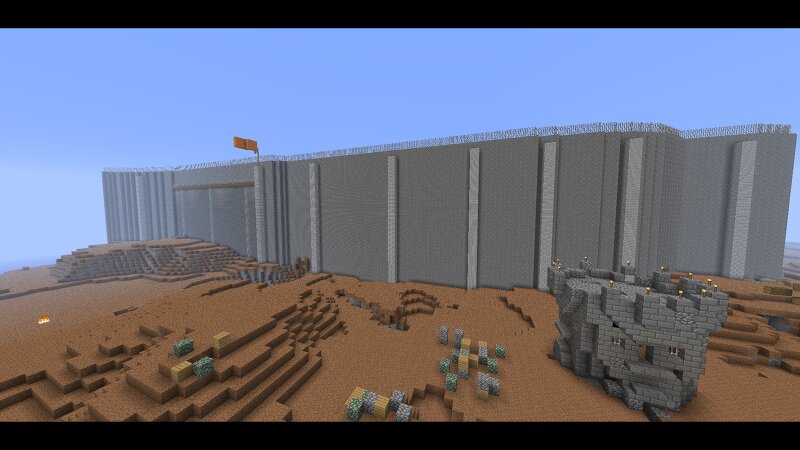
Download Stone City 1.6.4 — free Minecraft map. Created by Vladik190905. Tagged other, stonecity, survival, wasteland. Get the world/schematic file when available and explore more free maps on Eaglercraft Studio.
Creator notes
ENG: Installation: 1. Copy from folder saves Stone City into saves (example: AppData/Roaming/.tlauncher/legacy/minecraft/game/saves). 2. Copy content from folder mods to mods (example: AppData/Roaming/.tlauncher/legacy/minecraft/game/mods). 3. Copy from folder resourcepacks faithful into resourcepacks (example: AppData/Roaming/.tlauncher/legacy/minecraft/game/resourcepacks). 4. Launch game and open Stone City. Rules: 1. Do not cheating! 2. Don't go beyond the nether fence! 3. You may break some blocks. About map: An old map I created in 2023 for survivor. Author of the map - Vladik190905 RUS: Установка: 1. Скопируйте из папки saves Stone City в saves (пример: AppData/Roaming/.tlauncher/legacy/minecraft/game/saves). 2. Скопируйте содержимое папки mods в mods (пример: AppData/Roaming/.tlauncher/legacy/minecraft/game/mods). 3. Скопируйте из папки resourcepacks faithful в resourcepacks (пример: AppData/Roaming/.tlauncher/legacy/minecraft/game/resourcepacks). 4. Запустите игру и откройте Stone City. Правила: 1. Не использовать читы! 2. Не выходить за границу адского забора! 3. Некоторые блоки ломать можно. О карте: Старая карта которая была сделана мной в 2023 году для выживания. Автор
Added value
What’s included on this page
Preview, categories, compatibility, and tools on this page — not a bare file mirror.
- Creator
- Vladik190905
- Source
- Minecraft downloads library on Eaglercraft Studio
- Type
- Minecraft map / world
- Price
- Free download on Eaglercraft Studio
- Curation
- Listed with credit to Vladik190905 · studio preview & install guide
- Compatible with
- Minecraft Java (match version / loader in facts)
- Tags
- Other, Stonecity, Survival, Wasteland
Install guide
How to install this free Minecraft map
Eaglercraft Studio map listing with preview, creator credit, and install steps for Java worlds.
- 1Download the world archive (.zip / .mcworld / schematic) when available.
- 2For Java: extract into your .minecraft/saves folder (or import via your launcher).
- 3Launch Minecraft, select the world, and play. Keep a backup before overwriting saves.
Check any version notes in the facts panel — maps often target a specific Minecraft release.
Related free maps
More curated maps from the same library section.

CraftyFoxe · 761 diamonds · 418 views

CraftyFoxe · 761 diamonds · 339 views

CraftyFoxe · 761 diamonds · 319 views

CraftyFoxe · 761 diamonds · 306 views