
Stormsgate Grand Fantasy Adventure
Creator: Redd Stormsgate · 2026-09-26 · Maps · Free on Eaglercraft Studio
Download Stormsgate Grand Fantasy Adventure — free Minecraft map. Created by Redd Stormsgate. Tagged adventure, challenge adventure, fantasy, longterm. Get the world/schematic file when available and explore more free maps on Eaglercraft Studio.
Creator notes
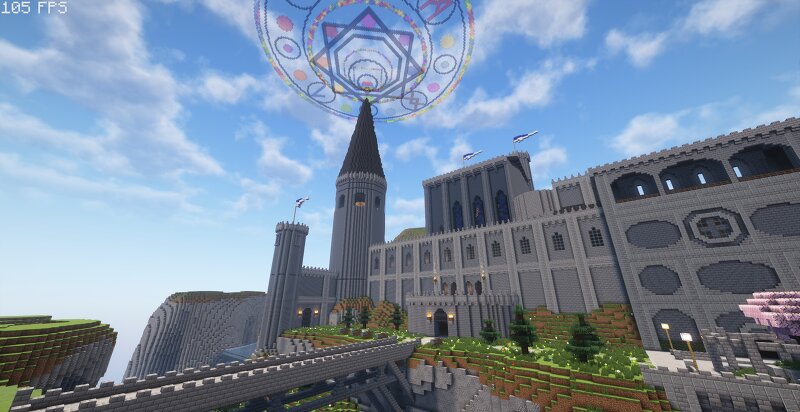
Welcome to the kingdom of Stormsgate! This world is my largest project yet. It's a fully interactive medieval adventure map in the style of The Legend Of Zelda, or Dragon Quest. As it's so large, expect this map to take YEARS to make. As of now it's only me working on it, with assets from various free use packs, and a couple builds by Beaufort-Scale-5 . All used packs and/or structures are credited withing castle town's adventurer's guild. Now without further ado... In a small village south of the castle You are called upon to save the kingdom and it's people! Travel across multiple from-scratch areas with their own troubles and lore! Castle Stormsgate: The central hub of the entire kingdom. When the Archmage Malleus went missing, it was only the start of the troubles the kingdom would go through. The magic circle above the castle is failing, and it's up to you to find the Archmage! You'll return here after every dungeon to unlock new sections of the castle. Each new section will point you in the direction of your next objective. Grimveil Forest: The manor deep in the woods once belonged to a local count. Alas, his foray into dark magics placed a fell curse over the entire forest
Added value
What’s included on this page
Preview, categories, compatibility, and tools on this page — not a bare file mirror.
- Creator
- Redd Stormsgate
- Source
- Minecraft downloads library on Eaglercraft Studio
- Type
- Minecraft map / world
- Price
- Free download on Eaglercraft Studio
- Curation
- Listed with credit to Redd Stormsgate · studio preview & install guide
- Compatible with
- Minecraft Java (match version / loader in facts)
- Tags
- Adventure, Challenge Adventure, Fantasy, Longterm, Magic, Medieval
Install guide
How to install this free Minecraft map
Eaglercraft Studio map listing with preview, creator credit, and install steps for Java worlds.
- 1Download the world archive (.zip / .mcworld / schematic) when available.
- 2For Java: extract into your .minecraft/saves folder (or import via your launcher).
- 3Launch Minecraft, select the world, and play. Keep a backup before overwriting saves.
Check any version notes in the facts panel — maps often target a specific Minecraft release.
Related free maps
More curated maps from the same library section.

CraftyFoxe · 761 diamonds · 418 views

CraftyFoxe · 761 diamonds · 339 views

CraftyFoxe · 761 diamonds · 319 views

CraftyFoxe · 761 diamonds · 306 views