
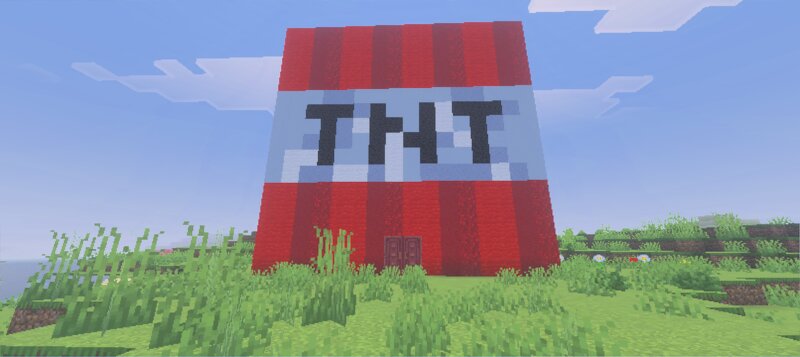
Survival Starter tnt house #2
Creator: Lxutix · 2026-08-31 · Maps · Free on Eaglercraft Studio
Download Survival Starter tnt house #2 — free Minecraft map. Created by Lxutix. Tagged other. Get the world/schematic file when available and explore more free maps on Eaglercraft Studio.
Creator notes
¡Lleva tu mundo de supervivencia al siguiente nivel con esta increíble y explosiva Casa TNT Inicial! Especialmente diseñada para el comienzo de tu aventura, esta base combina un exterior muy llamativo con un interior compacto, acogedor y 100% funcional para tus primeros días en Minecraft. Características principales: Diseño exterior único: Una casa con la forma exacta de un bloque TNT gigante, perfecta para destacar en cualquier paisaje o servidor multijugador. Planta baja (Cocina/Comedor): Un área común detallada que cuenta con una gran mesa de comedor, sillas elegantes, faroles colgantes y un suelo cálido. Ideal para organizar tus necesidades básicas. Segunda habitación (dormitorio/almacén): Un espacio optimizado que incluye tu cama, muchos cofres para almacenamiento, una configuración de encantamientos y decoraciones personalizadas con pinturas y soportes para armaduras. Azotea accesible: Sube directamente a la cima del bloque de TNT para usarlo como punto de observación, plataforma de tiro con arco o granja en terreno elevado. ¡Es la base inicial perfecta si quieres algo original, compacto y lleno de estilo para comenzar tu nuevo mundo! ¡Asegúrate de seguirme para no perderte n
Added value
What’s included on this page
Preview, categories, compatibility, and tools on this page — not a bare file mirror.
- Creator
- Lxutix
- Source
- Minecraft downloads library on Eaglercraft Studio
- Type
- Minecraft map / world
- Price
- Free download on Eaglercraft Studio
- Curation
- Listed with credit to Lxutix · studio preview & install guide
- Compatible with
- Minecraft Java (match version / loader in facts)
- Tags
- Other
Install guide
How to install this free Minecraft map
Eaglercraft Studio map listing with preview, creator credit, and install steps for Java worlds.
- 1Download the world archive (.zip / .mcworld / schematic) when available.
- 2For Java: extract into your .minecraft/saves folder (or import via your launcher).
- 3Launch Minecraft, select the world, and play. Keep a backup before overwriting saves.
Check any version notes in the facts panel — maps often target a specific Minecraft release.
Related free maps
More curated maps from the same library section.

CraftyFoxe · 761 diamonds · 418 views

CraftyFoxe · 761 diamonds · 339 views

CraftyFoxe · 761 diamonds · 319 views

CraftyFoxe · 761 diamonds · 306 views