
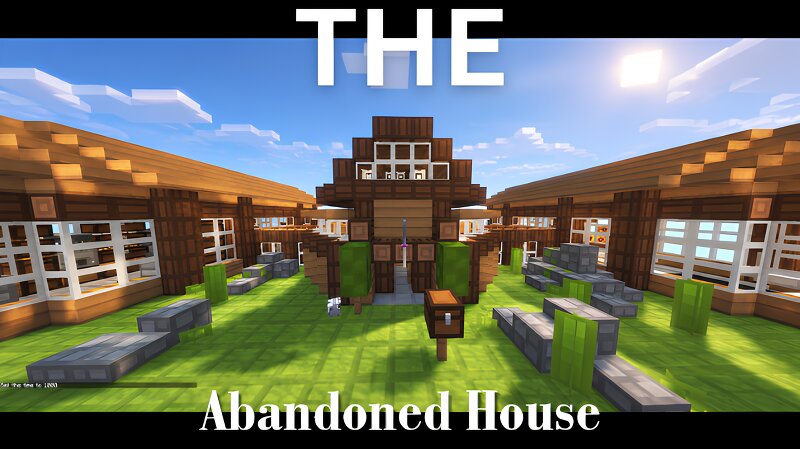
The Abandoned House
Creator: BestHiderXD_ · 2026-09-22 · Maps · Free on Eaglercraft Studio
Download The Abandoned House — free Minecraft map. Created by BestHiderXD_. Tagged eaglercraft, fyp, house, land structure. Get the world/schematic file when available and explore more free maps on Eaglercraft Studio.
Creator notes
=== THE ABANDOND HOUSE === = CREATED BY BESTHIDERXD = = MINECRAFT VANILLA 1.12 = = BUILT IN EAGLERCRAFT 1.12 = === HOW TO IMPORT SCHEMATIC === 1. Extract the Zip File. 2. Open The "Eaglercraft_1.12_WASM-GC.html" file. 3. Click Single Player, And Press Create World. 4. Import the Schematic. = If you want to load .epk file, press "Load .epk File" = If you want to load vanilla file, press "Import Vanilla World" - both options work succesfully - Optional: If you want the Build to Look a bit cooler, Use the Given Pack "Rodrigo's Pack (1.12).zip) === CREDITS === - EaglerCraft: For the HTML File. - Rodrigo Al: For the 8x TexturePack. note: Also the reason why it's named survival bedwars, is because i was tryna make a bedwars map, But im not that good at making maps, So I scratched it and decided to make a cool house. This is also my first build in minecraft. if you want to use this schematic, please give credit. to contact me visit my PlanetMinecraft Account. PMC: BestHiderXD_ ! Thanks for Downloading !
Added value
What’s included on this page
Preview, categories, compatibility, and tools on this page — not a bare file mirror.
- Creator
- BestHiderXD_
- Source
- Minecraft downloads library on Eaglercraft Studio
- Type
- Minecraft map / world
- Price
- Free download on Eaglercraft Studio
- Curation
- Listed with credit to BestHiderXD_ · studio preview & install guide
- Compatible with
- Minecraft Java (match version / loader in facts)
- Tags
- Eaglercraft, Fyp, House, Land Structure, Map, Minecraft
Install guide
How to install this free Minecraft map
Eaglercraft Studio map listing with preview, creator credit, and install steps for Java worlds.
- 1Download the world archive (.zip / .mcworld / schematic) when available.
- 2For Java: extract into your .minecraft/saves folder (or import via your launcher).
- 3Launch Minecraft, select the world, and play. Keep a backup before overwriting saves.
Check any version notes in the facts panel — maps often target a specific Minecraft release.
Related free maps
More curated maps from the same library section.

CraftyFoxe · 761 diamonds · 418 views

CraftyFoxe · 761 diamonds · 339 views

CraftyFoxe · 761 diamonds · 319 views

CraftyFoxe · 761 diamonds · 306 views