
The Ancient Obsidian Blade (Version: 26.2, Java Edition)
Creator: FlintFifty · 2026-09-24 · Maps · Free on Eaglercraft Studio
Download The Ancient Obsidian Blade (Version: 26.2, Java Edition) — free Minecraft map. Created by FlintFifty. Tagged air structure. Get the world/schematic file when available and explore more free maps on Eaglercraft Studio.
Creator notes
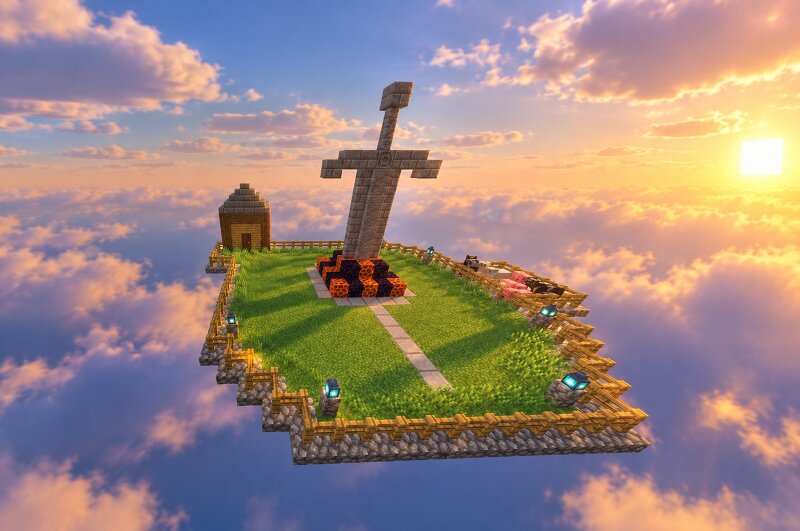
Welcome to The Ancient Obsidian Blade! Looking for a stunning, clean, and 100% blocky build showcase for your collection or inspiration? This custom-built floating platform features a massive, ancient stone sword struck deep into a glowing obsidian altar, surrounded by a peaceful grassy area and detailed atmosphere. Features: Pure Build Showcase: Focuses entirely on aesthetic design and block composition with strict adherence to Minecraft's blocky style—no messy organic curves! Shader Friendly: Designed to look incredible with modern shaders, making it perfect for cinematic screenshots and portfolio displays. Lightweight & Clean: Small-scale design (approx. 25x25) that loads instantly and can easily be pasted anywhere using WorldEdit or Litematica. Feel free to explore the map, use it as inspiration, or feature it in your own build worlds! If you enjoyed it, don't forget to leave a diamond/heart and download it! Version: 26.2 (Java Edition Only) Support me via Revolut or Ko-Fi: www.revolut.me/venelinchobg https://ko-fi.com/venkata2006ta Subscribe to my YouTube channel if you want: www.youtube.com/channel/UCM1boxDAbHLNjXzVNBF6zNw
Added value
What’s included on this page
Preview, categories, compatibility, and tools on this page — not a bare file mirror.
- Creator
- FlintFifty
- Source
- Minecraft downloads library on Eaglercraft Studio
- Type
- Minecraft map / world
- Price
- Free download on Eaglercraft Studio
- Curation
- Listed with credit to FlintFifty · studio preview & install guide
- Compatible with
- Minecraft Java (match version / loader in facts)
- Tags
- Air Structure
Install guide
How to install this free Minecraft map
Eaglercraft Studio map listing with preview, creator credit, and install steps for Java worlds.
- 1Download the world archive (.zip / .mcworld / schematic) when available.
- 2For Java: extract into your .minecraft/saves folder (or import via your launcher).
- 3Launch Minecraft, select the world, and play. Keep a backup before overwriting saves.
Check any version notes in the facts panel — maps often target a specific Minecraft release.
Related free maps
More curated maps from the same library section.

CraftyFoxe · 761 diamonds · 418 views

CraftyFoxe · 761 diamonds · 339 views

CraftyFoxe · 761 diamonds · 319 views

CraftyFoxe · 761 diamonds · 306 views