
The Big Mountians
Creator: Akif_2012 · 2026-09-06 · Maps · Free on Eaglercraft Studio
Download The Big Mountians — free Minecraft map. Created by Akif_2012. Tagged other. Get the world/schematic file when available and explore more free maps on Eaglercraft Studio.
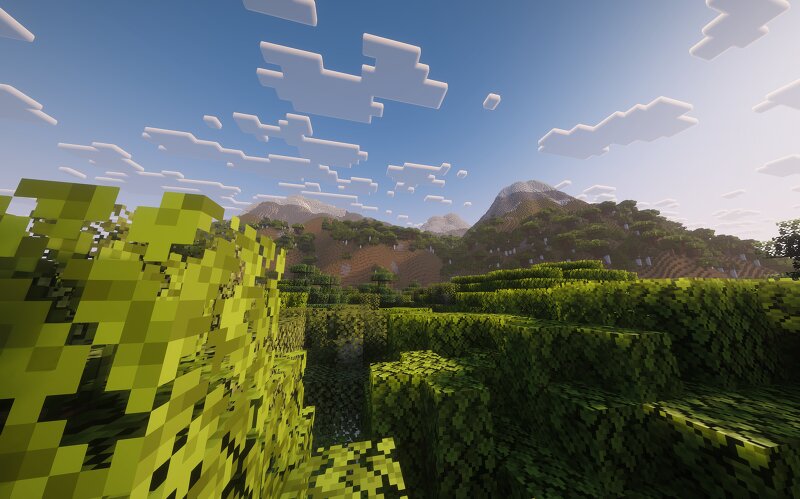
Creator notes
AI Mode conversation: Could make a discription for this images? You sent: 15 images and said: Could make a discription for this images? Could make a discription for this images? These images show a breathtaking, highly realistic Minecraft landscape enhanced with high-end shaders , featuring advanced terrain generation that mimics real-world geography.Here is a breakdown of the key elements across the images:Terrain & Biomes Massive Snow-Capped Mountains: Majestic, towering peaks dominate the horizon. Their lower slopes consist of smooth, rolling dirt and grass, which gradually transition into stark stone and heavy snow caps near the summits. Dense Forests & Jungles: Thick canopies of vibrant green leaves blanket the lowlands and valleys. The tree placement creates a rich, organic wilderness that looks much more natural than standard, vanilla world generation. Desert Oasis: One perspective highlights a small, realistic desert pocket nestled perfectly between grassy hills, complete with sand and scattered cacti. Lighting & Atmosphere Realistic Atmosphere & Fog: A soft, volumetric haze hangs over the landscape, adding immense depth and a sense of scale to the distant horizons. Dynamic
Added value
What’s included on this page
Preview, categories, compatibility, and tools on this page — not a bare file mirror.
- Creator
- Akif_2012
- Source
- Minecraft downloads library on Eaglercraft Studio
- Type
- Minecraft map / world
- Price
- Free download on Eaglercraft Studio
- Curation
- Listed with credit to Akif_2012 · studio preview & install guide
- Compatible with
- Minecraft Java (match version / loader in facts)
- Tags
- Other
Install guide
How to install this free Minecraft map
Eaglercraft Studio map listing with preview, creator credit, and install steps for Java worlds.
- 1Download the world archive (.zip / .mcworld / schematic) when available.
- 2For Java: extract into your .minecraft/saves folder (or import via your launcher).
- 3Launch Minecraft, select the world, and play. Keep a backup before overwriting saves.
Check any version notes in the facts panel — maps often target a specific Minecraft release.
Related free maps
More curated maps from the same library section.

CraftyFoxe · 761 diamonds · 418 views

CraftyFoxe · 761 diamonds · 339 views

CraftyFoxe · 761 diamonds · 319 views

CraftyFoxe · 761 diamonds · 306 views