
The Breeze Hall, Shanghai | 1:1.5 Minecraft Reconstruction
Creator: Waller_Design · 2026-09-11 · Maps · Free on Eaglercraft Studio
Download The Breeze Hall, Shanghai | 1:1.5 Minecraft Reconstruction — free Minecraft map. Created by Waller_Design. Tagged 3d art, architecturalreconstruction, minecraft, minecraftarchitecture. Get the world/schematic file when available and explore more free maps on Eaglercraft Studio.
Creator notes
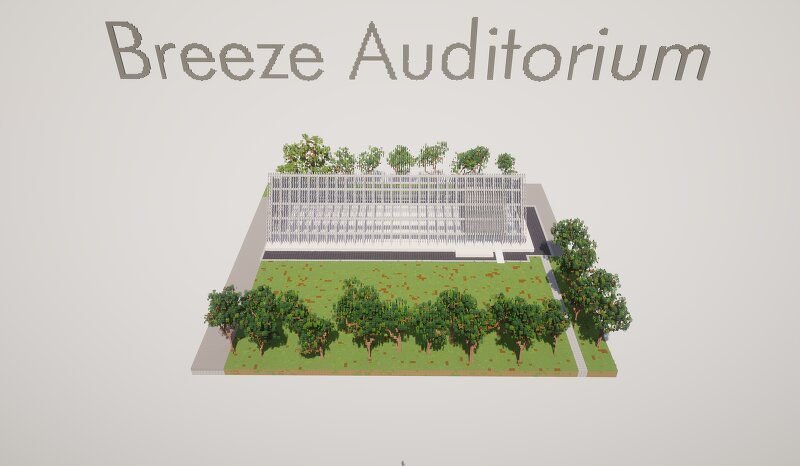
Description I’m pleased to share my Minecraft reconstruction of The Breeze Hall , a contemporary public building located in Shanghai’s Lu Xun Park and originally designed by SHISUO design office . This project focuses on the character of the original architecture: a light and permeable facade that filters sunlight, creates changing shadows, and connects the building with its surrounding landscape. The tree-lined paths, open lawn, and preserved woodland are also recreated to reflect the relationship between the hall and everyday life in the park. Built by Waller. Desgin , this version uses a 1:1.5 scale and is made for Minecraft Java Edition 1.21.9 . Technical Information Version: Minecraft Java Edition 1.21.9 Scale: 1:1.5 Important: Please disable block updates before loading or using the build. Otherwise, parts of the facade may change or break. Original project: The Breeze Hall by SHISUO design office Location: Lu Xun Park, Hongkou District, Shanghai, China Original project reference: https://www.archdaily.com/zh/1023703/wei-ri-chang-xian-li-wei-feng-li-tang-shi-suo-she-ji
Added value
What’s included on this page
Preview, categories, compatibility, and tools on this page — not a bare file mirror.
- Creator
- Waller_Design
- Source
- Minecraft downloads library on Eaglercraft Studio
- Type
- Minecraft map / world
- Price
- Free download on Eaglercraft Studio
- Curation
- Listed with credit to Waller_Design · studio preview & install guide
- Compatible with
- Minecraft Java (match version / loader in facts)
- Tags
- 3d Art, Architecturalreconstruction, Minecraft, Minecraftarchitecture, Modernarchitecture, Shanghai
Install guide
How to install this free Minecraft map
Eaglercraft Studio map listing with preview, creator credit, and install steps for Java worlds.
- 1Download the world archive (.zip / .mcworld / schematic) when available.
- 2For Java: extract into your .minecraft/saves folder (or import via your launcher).
- 3Launch Minecraft, select the world, and play. Keep a backup before overwriting saves.
Check any version notes in the facts panel — maps often target a specific Minecraft release.
Related free maps
More curated maps from the same library section.

CraftyFoxe · 761 diamonds · 418 views

CraftyFoxe · 761 diamonds · 339 views

CraftyFoxe · 761 diamonds · 319 views

CraftyFoxe · 761 diamonds · 306 views