
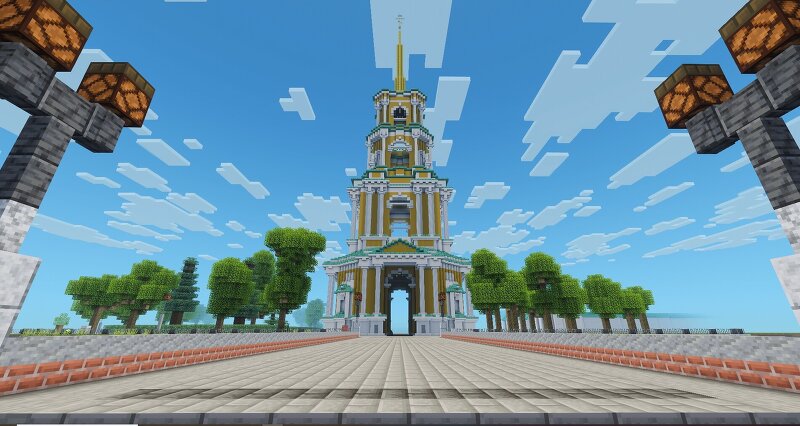
The Cathedral Bell Tower of the Ryazan Kremlin
Creator: Maigel1980 · 2026-09-18 · Maps · Free on Eaglercraft Studio
Download The Cathedral Bell Tower of the Ryazan Kremlin — free Minecraft map. Created by Maigel1980. Tagged land structure. Get the world/schematic file when available and explore more free maps on Eaglercraft Studio.
Creator notes
The height of the 4-tier bell tower is over 83 meters. It is one of the tallest bell towers in Russia, as well as a good example of classical style in architecture. The foundation of the Sobornaya (Cathedral) bell tower was laid down on the site of Glebovskaya tower in 1789 but the bell tower was finished only 50 years later. Different architects took part in the construction of the bell tower. The first project was offered by Stepan Vorotilov, an architect from Kostroma. The first tier of the bell tower was built based on this project even though it was rejected by local authorities. But the second tier of the bell tower was already built based on the project of architect I. Russko in 1816. The famous Russian architect was commissioned with the task to finish the bell tower with the third tier in 1832. A viewing point is on the third tier. From there you can have a very beautiful view of all Ryazan, including the Kremlin. The sculptures of angels blowing trumpets are on the outside of the third tier of the bell tower. However, Nikolai Voronikhin who was the main architect of Ryazan province convinced the archbishop in the necessity of the four tier and the spire. The height of the
Added value
What’s included on this page
Preview, categories, compatibility, and tools on this page — not a bare file mirror.
- Creator
- Maigel1980
- Source
- Minecraft downloads library on Eaglercraft Studio
- Type
- Minecraft map / world
- Price
- Free download on Eaglercraft Studio
- Curation
- Listed with credit to Maigel1980 · studio preview & install guide
- Compatible with
- Minecraft Java (match version / loader in facts)
- Tags
- Land Structure
Install guide
How to install this free Minecraft map
Eaglercraft Studio map listing with preview, creator credit, and install steps for Java worlds.
- 1Download the world archive (.zip / .mcworld / schematic) when available.
- 2For Java: extract into your .minecraft/saves folder (or import via your launcher).
- 3Launch Minecraft, select the world, and play. Keep a backup before overwriting saves.
Check any version notes in the facts panel — maps often target a specific Minecraft release.
Related free maps
More curated maps from the same library section.

CraftyFoxe · 761 diamonds · 418 views

CraftyFoxe · 761 diamonds · 339 views

CraftyFoxe · 761 diamonds · 319 views

CraftyFoxe · 761 diamonds · 306 views