
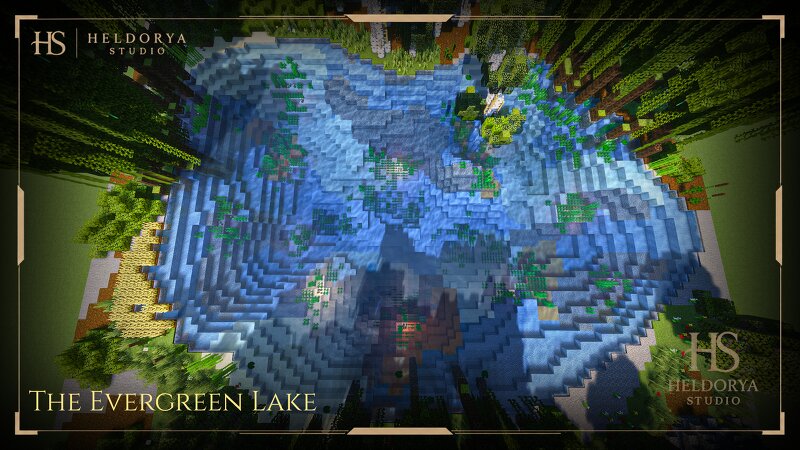
The Evergreen Lake - Custom Natural Landscape
Creator: Heldorya_Studio · 2026-09-03 · Maps · Free on Eaglercraft Studio
Download The Evergreen Lake - Custom Natural Landscape — free Minecraft map. Created by Heldorya_Studio. Tagged custom, lake, landscape, natural. Get the world/schematic file when available and explore more free maps on Eaglercraft Studio.
Creator notes
🌿 About the Build The Evergreen Lake is a detailed natural landscape built around a custom-made lake, with handcrafted terrain, trees, and natural surroundings. Designed to feel organic and immersive, it adds a peaceful and scenic environment to any Minecraft world. 🍃✨ 📦 Technical Details • 🧱 Minecraft Version : Java 1.21.1+ • 📦 Includes : World Download + Schematic + Litematic • 🧱 Fully Vanilla (No Mods Required) • 🎨 Screenshots Shader : Complementary Unbound • 📏 Size: Width & Length 87x74 Height 25 👤 Creator / Support • 🏗️ Created by: Heldorya Studio • 🎁 Unlock 150+ Premium Builds + Weekly Releases • 👑 Patreon Access Tiers: Supporter / Builder’s Circle / Master Builder • 🔗 Patreon: Click here ✨ Features • 🌊 Custom-Built Lake • 🌳 Custom Trees • ⛰️ Custom Terrain • 🌿 Detailed Natural Landscaping • 🍃 Organic Environment • ✨ Handcrafted Natural Details 🧭 Need Help Installing the World Download? A complete step-by-step guide is available on the blog, explaining how to correctly install the map and start playing without issues. 🔗 World Installation Guide 🔗 Heldorya Studio Official Hub & Blog Explore builds, updates, behind-the-scenes and blog posts: Visit Website
Added value
What’s included on this page
Preview, categories, compatibility, and tools on this page — not a bare file mirror.
- Creator
- Heldorya_Studio
- Source
- Minecraft downloads library on Eaglercraft Studio
- Type
- Minecraft map / world
- Price
- Free download on Eaglercraft Studio
- Curation
- Listed with credit to Heldorya_Studio · studio preview & install guide
- Compatible with
- Minecraft Java (match version / loader in facts)
- Tags
- Custom, Lake, Landscape, Natural, Nature, Tree
Install guide
How to install this free Minecraft map
Eaglercraft Studio map listing with preview, creator credit, and install steps for Java worlds.
- 1Download the world archive (.zip / .mcworld / schematic) when available.
- 2For Java: extract into your .minecraft/saves folder (or import via your launcher).
- 3Launch Minecraft, select the world, and play. Keep a backup before overwriting saves.
Check any version notes in the facts panel — maps often target a specific Minecraft release.
Related free maps
More curated maps from the same library section.

CraftyFoxe · 761 diamonds · 418 views

CraftyFoxe · 761 diamonds · 339 views

CraftyFoxe · 761 diamonds · 319 views

CraftyFoxe · 761 diamonds · 306 views