
The Illinois
Creator: aruiz28 · 2026-09-21 · Maps · Free on Eaglercraft Studio
Download The Illinois — free Minecraft map. Created by aruiz28. Tagged illinois, land structure, other, skyscraper. Get the world/schematic file when available and explore more free maps on Eaglercraft Studio.
Creator notes
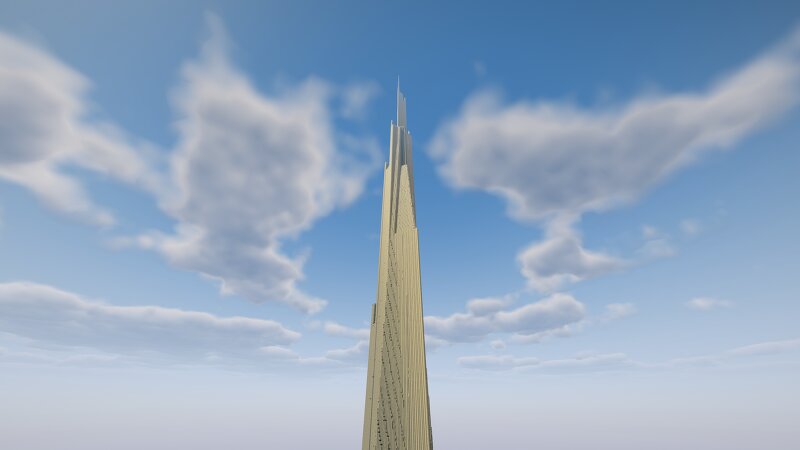
1:1 height recreation (Aproximately 1610 blocks tall) of a 3d model, you'll 100% need a height limit mod to render this beast. I painted a basic pattern on the building, you are free to improve it and post it for yourself. The Mile-High Illinois , or simply The Illinois , is an unbuilt conceptual design by American architect Frank Lloyd Wright for a one-mile-high (1.6 km) skyscraper to be built in Chicago . Wright described the project in his 1957 book, A Testament . [1] The design included 528 stories, later revised to 365 stories, with a gross area of 18,460,000 square feet (1,715,000 m 2 ). Wright stated that there would be parking for 15,000 cars and 100 helicopters. If built, it would top the list of the tallest buildings in the world by far, being more than four times the height of the Empire State Building , almost twice as tall as the world's tallest building as of 2026, the Burj Khalifa ; and about 2,400 feet (730 m) taller than the under-construction Jeddah Tower – the latter two both designed by Adrian Smith , whose designs for both buildings are said to have been inspired by that of The Illinois.
Added value
What’s included on this page
Preview, categories, compatibility, and tools on this page — not a bare file mirror.
- Creator
- aruiz28
- Source
- Minecraft downloads library on Eaglercraft Studio
- Type
- Minecraft map / world
- Price
- Free download on Eaglercraft Studio
- Curation
- Listed with credit to aruiz28 · studio preview & install guide
- Compatible with
- Minecraft Java (match version / loader in facts)
- Tags
- Illinois, Land Structure, Other, Skyscraper, Tallest, Theillinois
Install guide
How to install this free Minecraft map
Eaglercraft Studio map listing with preview, creator credit, and install steps for Java worlds.
- 1Download the world archive (.zip / .mcworld / schematic) when available.
- 2For Java: extract into your .minecraft/saves folder (or import via your launcher).
- 3Launch Minecraft, select the world, and play. Keep a backup before overwriting saves.
Check any version notes in the facts panel — maps often target a specific Minecraft release.
Related free maps
More curated maps from the same library section.

CraftyFoxe · 761 diamonds · 418 views

CraftyFoxe · 761 diamonds · 339 views

CraftyFoxe · 761 diamonds · 319 views

CraftyFoxe · 761 diamonds · 306 views