
The Isle of Lunareth | An Expanding Minecraft World
Creator: EternalDawn · 2026-09-24 · Maps · Free on Eaglercraft Studio
Download The Isle of Lunareth | An Expanding Minecraft World — free Minecraft map. Created by EternalDawn. Tagged architecture, castle, cinematic, city. Get the world/schematic file when available and explore more free maps on Eaglercraft Studio.
Creator notes
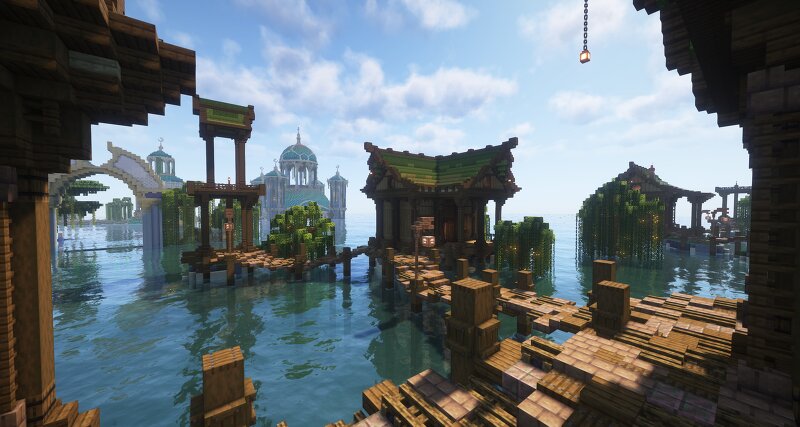
The Isle of Lunareth Is an ever growing Minecraft worldbuilding project, created to tell a story through architecture, landscapes, cities, and detailed environments. Explore a world shaped by ancient elven civilizations, grand cities, mysterious places, and stories yet to be discovered. Lunareth will continue to expand with every new update, adding new locations, builds, and chapters to the world. Part I — Thalaryn & the Tidetemple The journey into Lunareth begins in Thalaryn, a coastal city built around the magnificent Tidetemple. This first chapter introduces the world of Lunareth, its architecture, atmosphere, and the first pieces of its story. Explore the city, discover the Tidetemple, and experience the beginning of a world that will continue to grow with every update. -------------------------------------------------------------------------------------------------------------------------------------------------------------------------- At the end of the project, the whole map will be available to download and exploreable :)
Added value
What’s included on this page
Preview, categories, compatibility, and tools on this page — not a bare file mirror.
- Creator
- EternalDawn
- Source
- Minecraft downloads library on Eaglercraft Studio
- Type
- Minecraft map / world
- Price
- Free download on Eaglercraft Studio
- Curation
- Listed with credit to EternalDawn · studio preview & install guide
- Compatible with
- Minecraft Java (match version / loader in facts)
- Tags
- Architecture, Castle, Cinematic, City, Dawn, Elven
Install guide
How to install this free Minecraft map
Eaglercraft Studio map listing with preview, creator credit, and install steps for Java worlds.
- 1Download the world archive (.zip / .mcworld / schematic) when available.
- 2For Java: extract into your .minecraft/saves folder (or import via your launcher).
- 3Launch Minecraft, select the world, and play. Keep a backup before overwriting saves.
Check any version notes in the facts panel — maps often target a specific Minecraft release.
Related free maps
More curated maps from the same library section.

CraftyFoxe · 761 diamonds · 418 views

CraftyFoxe · 761 diamonds · 339 views

CraftyFoxe · 761 diamonds · 319 views

CraftyFoxe · 761 diamonds · 306 views