
The Maze of Xoroth - Backrooms for mc 26.2+
Creator: Gamon · 2026-09-01 · Maps · Free on Eaglercraft Studio
Download The Maze of Xoroth - Backrooms for mc 26.2+ — free Minecraft map. Created by Gamon. Tagged backrooms, hallways, labyrinth, land structure. Get the world/schematic file when available and explore more free maps on Eaglercraft Studio.
Creator notes
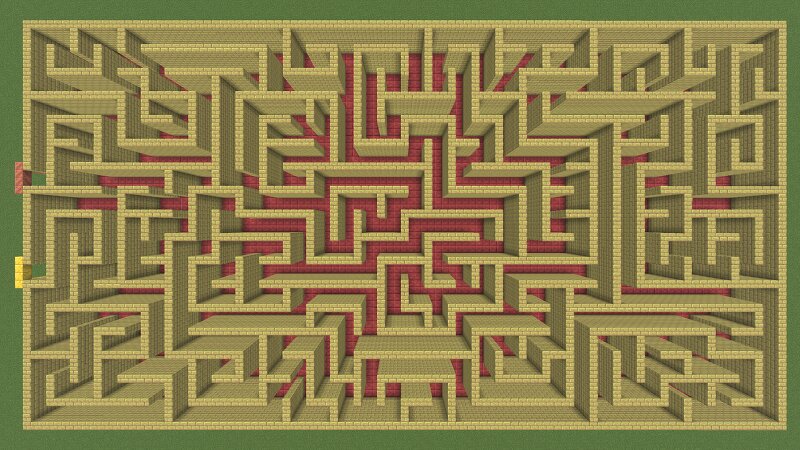
VERSION 26.2+ ONLY - maze is made of cinnabar and sulfur blocks The Maze of Xoroth is a 100% hand made maze and designed fully by me using my brain, no maze generators or algorithms were used to create this maze its purely made and designed by me. I wanted to make a maze that is not too big or too small just the acurate size maze with 2 blocks wide pathways and i strategicaly designed it in a way to make it as hard as possible for its size to confuse the player and make them back track with precisely designed loops and dead ends that trick players. This maze is significantly harder than a randomly generated one this size would be because of its strategic and precise layout made to confuse the player and make them backtrack. Download the map and see for your self that this maze is extremely hard for its size its much harder than it looks Feel free to use this maze in your builds or on a server.
Added value
What’s included on this page
Preview, categories, compatibility, and tools on this page — not a bare file mirror.
- Creator
- Gamon
- Source
- Minecraft downloads library on Eaglercraft Studio
- Type
- Minecraft map / world
- Price
- Free download on Eaglercraft Studio
- Curation
- Listed with credit to Gamon · studio preview & install guide
- Compatible with
- Minecraft Java (match version / loader in facts)
- Tags
- Backrooms, Hallways, Labyrinth, Land Structure, Liminal, Maze
Install guide
How to install this free Minecraft map
Eaglercraft Studio map listing with preview, creator credit, and install steps for Java worlds.
- 1Download the world archive (.zip / .mcworld / schematic) when available.
- 2For Java: extract into your .minecraft/saves folder (or import via your launcher).
- 3Launch Minecraft, select the world, and play. Keep a backup before overwriting saves.
Check any version notes in the facts panel — maps often target a specific Minecraft release.
Related free maps
More curated maps from the same library section.

CraftyFoxe · 761 diamonds · 418 views

CraftyFoxe · 761 diamonds · 339 views

CraftyFoxe · 761 diamonds · 319 views

CraftyFoxe · 761 diamonds · 306 views