
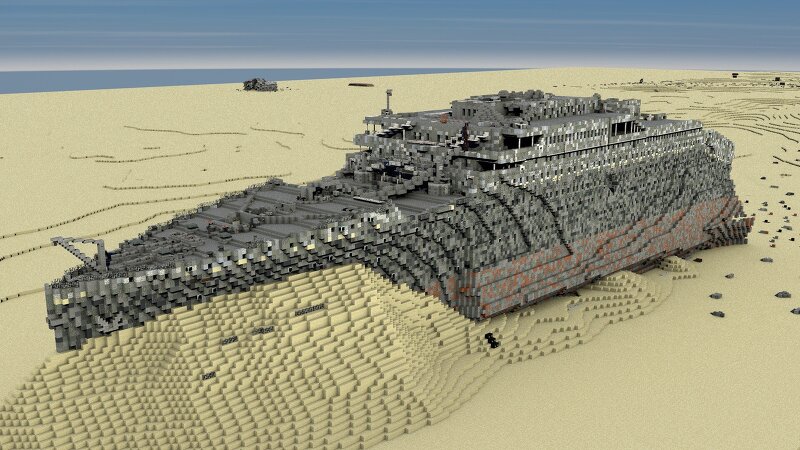
The wreck of R.M.S. Titanic
Creator: CronosDarth · 2026-09-19 · Maps · Free on Eaglercraft Studio
Download The wreck of R.M.S. Titanic — free Minecraft map. Created by CronosDarth. Tagged boat, cronosdarth, disaster, diving. Get the world/schematic file when available and explore more free maps on Eaglercraft Studio.
Creator notes
The wreck of the Titanic was discovered in 1985 by oceanographer Robert Ballard and a Franco-American expedition. Resting about 12,500 feet below the surface of the North Atlantic, the ship was found in two main pieces. The discovery confirmed the accuracy of the ship's final distress calls and provided valuable insights into the circumstances of its sinking. Since then, numerous expeditions have been conducted to explore and document the site, leading to the recovery of artifacts and extensive research on the ship's condition. The wreck of the Titanic remains a poignant symbol of one of the most infamous maritime disasters in history. Special thanks to: - Axandres (research vessel Keldysh) - FelixKa07 (building support) CC BY-NC-ND 4.0 - Creative Commons Attribution-NonCommercial-NoDerivatives 4.0 International This license requires that reusers give credit to the creator. It allows reusers to copy and distribute the material in any medium or format in unadapted form and for noncommercial purposes only.
Added value
What’s included on this page
Preview, categories, compatibility, and tools on this page — not a bare file mirror.
- Creator
- CronosDarth
- Source
- Minecraft downloads library on Eaglercraft Studio
- Type
- Minecraft map / world
- Price
- Free download on Eaglercraft Studio
- Curation
- Listed with credit to CronosDarth · studio preview & install guide
- Compatible with
- Minecraft Java (match version / loader in facts)
- Tags
- Boat, Cronosdarth, Disaster, Diving, Grave, Haunting
Install guide
How to install this free Minecraft map
Eaglercraft Studio map listing with preview, creator credit, and install steps for Java worlds.
- 1Download the world archive (.zip / .mcworld / schematic) when available.
- 2For Java: extract into your .minecraft/saves folder (or import via your launcher).
- 3Launch Minecraft, select the world, and play. Keep a backup before overwriting saves.
Check any version notes in the facts panel — maps often target a specific Minecraft release.
Related free maps
More curated maps from the same library section.

CraftyFoxe · 761 diamonds · 418 views

CraftyFoxe · 761 diamonds · 339 views

CraftyFoxe · 761 diamonds · 319 views

CraftyFoxe · 761 diamonds · 306 views