
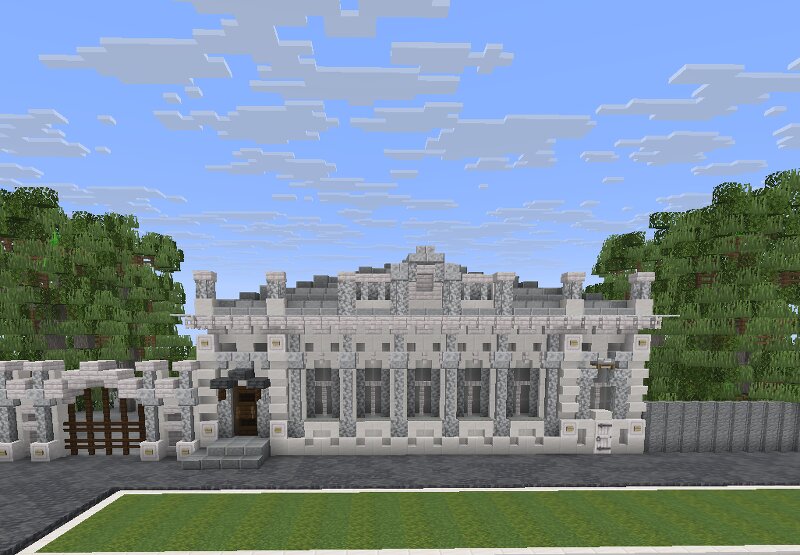
Дом Яушевых | The Yaushev house
Creator: HolyPlanet · 2026-09-06 · Maps · Free on Eaglercraft Studio
Download Дом Яушевых | The Yaushev house — free Minecraft map. Created by HolyPlanet. Tagged architecture, artnouveau, asia, building. Get the world/schematic file when available and explore more free maps on Eaglercraft Studio.
Creator notes
RUS: Памятник архитектуры, объект культурного наследия регионального значения в городе Троицк Челябинской области. Усадьба построена в 1880 году и принадлежала купцу первой гильдии Муллагали Яушеву. Представляет собой комплекс из двух жилых зданий и нескольких хозяйственных построек. Жилые здания представляют собой образцы купеческой архитектуры XIX века и выполнены в стиле модерн с элементами ордерной архитектуры и восточными мотивами. ENG: This is an architectural monument and a cultural heritage site of regional significance in the city of Troitsk, Chelyabinsk Oblast. The estate was built in 1880 and belonged to Mullagali Yaushev, a merchant of the first guild. It comprises a complex of two residential buildings and several outbuildings. The residential buildings are examples of 19th‑century merchant architecture and are designed in the Art Nouveau style with elements of order architecture and Eastern motifs. Version: 1.21.11
Added value
What’s included on this page
Preview, categories, compatibility, and tools on this page — not a bare file mirror.
- Creator
- HolyPlanet
- Source
- Minecraft downloads library on Eaglercraft Studio
- Type
- Minecraft map / world
- Price
- Free download on Eaglercraft Studio
- Curation
- Listed with credit to HolyPlanet · studio preview & install guide
- Compatible with
- Minecraft Java (match version / loader in facts)
- Tags
- Architecture, Artnouveau, Asia, Building, Chelyabinsk, City
Install guide
How to install this free Minecraft map
Eaglercraft Studio map listing with preview, creator credit, and install steps for Java worlds.
- 1Download the world archive (.zip / .mcworld / schematic) when available.
- 2For Java: extract into your .minecraft/saves folder (or import via your launcher).
- 3Launch Minecraft, select the world, and play. Keep a backup before overwriting saves.
Check any version notes in the facts panel — maps often target a specific Minecraft release.
Related free maps
More curated maps from the same library section.

CraftyFoxe · 761 diamonds · 418 views

CraftyFoxe · 761 diamonds · 339 views

CraftyFoxe · 761 diamonds · 319 views

CraftyFoxe · 761 diamonds · 306 views