
Top 5 satisfying Japanese Flower Banner Designs you can't miss in Minecraft
Creator: StormyMinecrafter · 2026-09-06 · Maps · Free on Eaglercraft Studio
Download Top 5 satisfying Japanese Flower Banner Designs you can't miss in Mine — free Minecraft map. Created by StormyMinecrafter. Tagged amazing, art, banner, cool. Get the world/schematic file when available and explore more free maps on Eaglercraft Studio.
Creator notes
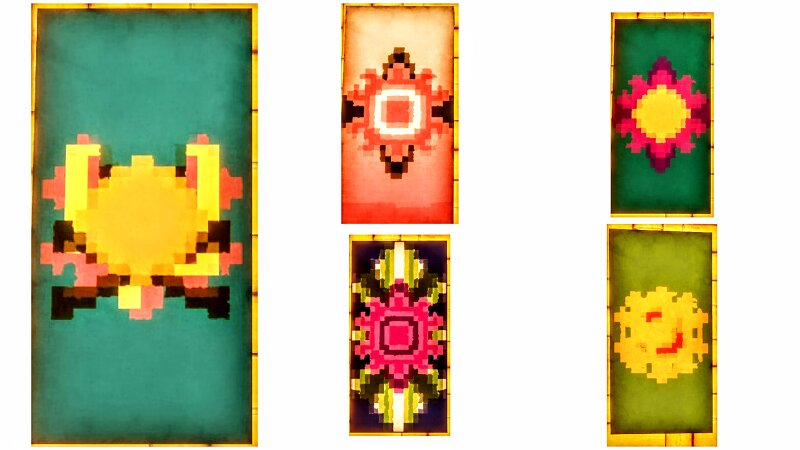
Looking for new inspiration? Here are 5 beautiful Japanese Flower Banner designs to elevate your Minecraft world today. I am sharing my favorite custom Minecraft banner designs that capture a peaceful, aesthetic vibe. Whether you are decorating a traditional base or just adding detail to your builds, these patterns are simple to craft and look great in any setting. We will walk through the specific steps for creating the Kerria, Purple, Anemone, Lotus, and Pink Petal styles. These Japanese Flower Banner patterns are perfect for players who love adding unique, artistic flair to a Japanese style build. If you are looking for fresh Minecraft creative ideas to customize your world, these tutorials will help you get started quickly. Also immerse yourself with the amazing Japanese music, filled with the amazing atmosphere and beautiful melodies, that instruments make. Let me know which design is your favorite in the comments below, and like and subscribe for more weekly building guides.
Added value
What’s included on this page
Preview, categories, compatibility, and tools on this page — not a bare file mirror.
- Creator
- StormyMinecrafter
- Source
- Minecraft downloads library on Eaglercraft Studio
- Type
- Minecraft map / world
- Price
- Free download on Eaglercraft Studio
- Curation
- Listed with credit to StormyMinecrafter · studio preview & install guide
- Compatible with
- Minecraft Java (match version / loader in facts)
- Tags
- Amazing, Art, Banner, Cool, Design, Environment
Install guide
How to install this free Minecraft map
Eaglercraft Studio map listing with preview, creator credit, and install steps for Java worlds.
- 1Download the world archive (.zip / .mcworld / schematic) when available.
- 2For Java: extract into your .minecraft/saves folder (or import via your launcher).
- 3Launch Minecraft, select the world, and play. Keep a backup before overwriting saves.
Check any version notes in the facts panel — maps often target a specific Minecraft release.
Related free maps
More curated maps from the same library section.

CraftyFoxe · 761 diamonds · 418 views

CraftyFoxe · 761 diamonds · 339 views

CraftyFoxe · 761 diamonds · 319 views

CraftyFoxe · 761 diamonds · 306 views