
Towny Exalted - Ark 2.0 (Project Arkotta)
Creator: ZenoBlaze · 2026-09-25 · Maps · Free on Eaglercraft Studio
Download Towny Exalted - Ark 2.0 (Project Arkotta) — free Minecraft map. Created by ZenoBlaze. Tagged ark, arkotta, exalted, land structure. Get the world/schematic file when available and explore more free maps on Eaglercraft Studio.
Creator notes
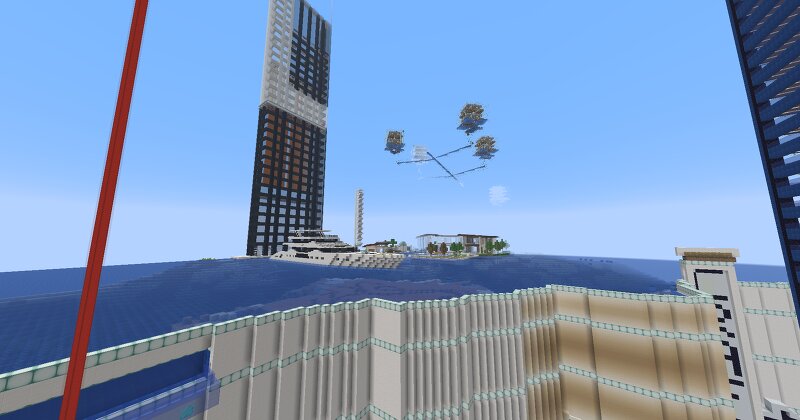
Project Arkotta was started by ARKempire and mp03 in 2019, next to the original Ark area with the shops, grinders and cookers. Ark wanted to convert a whole mesa biome into an area with gigantic farms, grinders, cookers, shops and much more to provide free money and materials to the economy in name of the Empire nation. A new town was created, called Arkotta for players who wanted to help on the project. They could teleport to the town spawn and start mining there. Shops were set up for the mined blocks to sell back to Ark. It took months to clear all the terracotta, stone and etc. to make way for all the big projects Ark had. Most of the area was cleared in the summer of 2019. Some notable players who helped on the project are Kurt_the_Cyborg, ThyDarkrai (Auriem), and Rowen_01. Sadly only a few of the projects were actually built or partly built because of the great Exalted Purge that eventually resulted in Exalted shutting down completely. These projects were: - The giant quartz wall surrounding the whole area - Mob grinders - A giant farm - A giant Mario themed path - New Empire Arena - Embassy plots with mansions for notable people in Ark and/or Empire
Added value
What’s included on this page
Preview, categories, compatibility, and tools on this page — not a bare file mirror.
- Creator
- ZenoBlaze
- Source
- Minecraft downloads library on Eaglercraft Studio
- Type
- Minecraft map / world
- Price
- Free download on Eaglercraft Studio
- Curation
- Listed with credit to ZenoBlaze · studio preview & install guide
- Compatible with
- Minecraft Java (match version / loader in facts)
- Tags
- Ark, Arkotta, Exalted, Land Structure, Minesuperior, Towny
Install guide
How to install this free Minecraft map
Eaglercraft Studio map listing with preview, creator credit, and install steps for Java worlds.
- 1Download the world archive (.zip / .mcworld / schematic) when available.
- 2For Java: extract into your .minecraft/saves folder (or import via your launcher).
- 3Launch Minecraft, select the world, and play. Keep a backup before overwriting saves.
Check any version notes in the facts panel — maps often target a specific Minecraft release.
Related free maps
More curated maps from the same library section.

CraftyFoxe · 761 diamonds · 418 views

CraftyFoxe · 761 diamonds · 339 views

CraftyFoxe · 761 diamonds · 319 views

CraftyFoxe · 761 diamonds · 306 views