
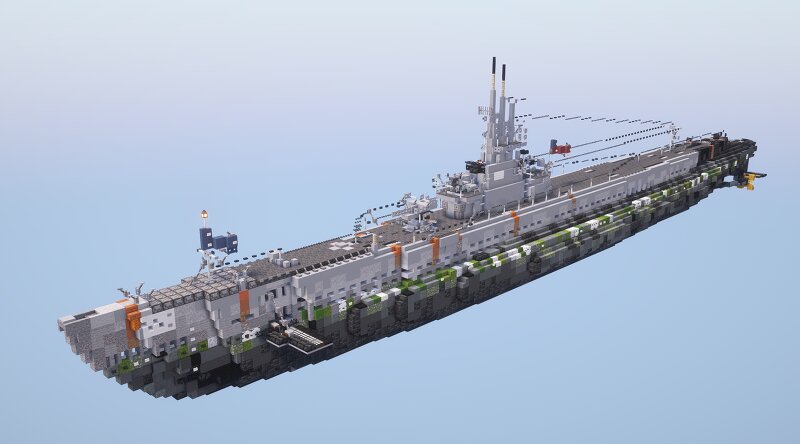
USS Drum (SS-228) Gato-Class Submarine (1.5:1 Scale)
Creator: GARRETT2BY4 · 2026-09-17 · Maps · Free on Eaglercraft Studio
Download USS Drum (SS-228) Gato-Class Submarine (1.5:1 Scale) — free Minecraft map. Created by GARRETT2BY4. Tagged download, gato, gato class, military. Get the world/schematic file when available and explore more free maps on Eaglercraft Studio.
Creator notes
USS Drum (SS-228) is a historic World War II-era Gato-class submarine. It is currently preserved as a museum ship at USS ALABAMA Battleship Memorial Park in Mobile, Alabama. Commissioned shortly before the attack on Pearl Harbor, it is famous for being the oldest surviving Gato-class submarine in the world. Drum received a total of 12 battle stars for her World War II service. She is credited with sinking 15 ships, a total of 80,580 tons of enemy shipping, eighth highest of all US submarines in total Japanese tonnage sunk. Commissioned by: Corey Ross IMPORTANT: Before pasting schematic input the following commands: //perf neighbors off //perf updates off //paste -e Texture Pack: Reflector's General Military Pack 2.0 Shaders Pack: Complimentary Unbound Game Version: Java 1.21.11 Please leave a diamond and follow if you enjoy this type of content! :)
Added value
What’s included on this page
Preview, categories, compatibility, and tools on this page — not a bare file mirror.
- Creator
- GARRETT2BY4
- Source
- Minecraft downloads library on Eaglercraft Studio
- Type
- Minecraft map / world
- Price
- Free download on Eaglercraft Studio
- Curation
- Listed with credit to GARRETT2BY4 · studio preview & install guide
- Compatible with
- Minecraft Java (match version / loader in facts)
- Tags
- Download, Gato, Gato Class, Military, Naval, Navy
Install guide
How to install this free Minecraft map
Eaglercraft Studio map listing with preview, creator credit, and install steps for Java worlds.
- 1Download the world archive (.zip / .mcworld / schematic) when available.
- 2For Java: extract into your .minecraft/saves folder (or import via your launcher).
- 3Launch Minecraft, select the world, and play. Keep a backup before overwriting saves.
Check any version notes in the facts panel — maps often target a specific Minecraft release.
Related free maps
More curated maps from the same library section.

CraftyFoxe · 761 diamonds · 418 views

CraftyFoxe · 761 diamonds · 339 views

CraftyFoxe · 761 diamonds · 319 views

CraftyFoxe · 761 diamonds · 306 views