
USS Missouri (BB-11) - December 1903
Creator: Empress_Victoria · 2026-09-22 · Maps · Free on Eaglercraft Studio
Download USS Missouri (BB-11) - December 1903 — free Minecraft map. Created by Empress_Victoria. Tagged water structure. Get the world/schematic file when available and explore more free maps on Eaglercraft Studio.
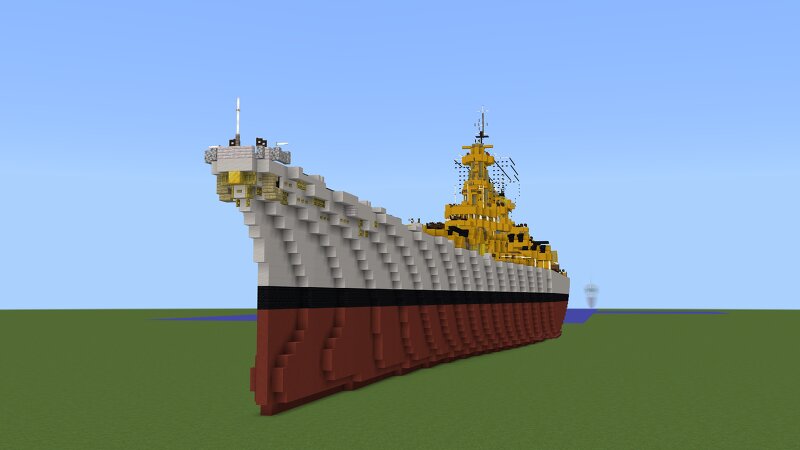
Creator notes
USS Missouri ( hull number : BB-11 ), a Maine -class battleship , was the second ship of her class and o f th e United States Navy to be named in honor of the 24th state . Missouri was laid down in February 1900 at the Newport News Shipbuilding & Drydock Company , was launched in December 1901, and was commissioned into the fleet in December 1903. She was armed with a main batte ry of four 12-inch (305 mm) guns and could steam at a top s peed of 18 knots (33 km/h; 21 mph). Missouri spent her entire career in the Atlantic with the North Atlantic Fleet , later renamed the Atlantic Fleet . In late 1907, she and the rest of the Atlantic Fleet circumnavigated the globe as the so-called Great W hite Fleet , which ended in February 1909. The ship was decommissioned in 1910, with periodic reactivations for summer training cru ises over the followed six years. After America entered World War I in April 1917, Missouri was brought back into service to train personnel for the expanding w artime Navy. She served briefly as a troopship in 1 919, carrying American soldiers back from France, before being decommissioned in September that year. Ultimately, she was sold for scrapping in January 1922.
Added value
What’s included on this page
Preview, categories, compatibility, and tools on this page — not a bare file mirror.
- Creator
- Empress_Victoria
- Source
- Minecraft downloads library on Eaglercraft Studio
- Type
- Minecraft map / world
- Price
- Free download on Eaglercraft Studio
- Curation
- Listed with credit to Empress_Victoria · studio preview & install guide
- Compatible with
- Minecraft Java (match version / loader in facts)
- Tags
- Water Structure
Install guide
How to install this free Minecraft map
Eaglercraft Studio map listing with preview, creator credit, and install steps for Java worlds.
- 1Download the world archive (.zip / .mcworld / schematic) when available.
- 2For Java: extract into your .minecraft/saves folder (or import via your launcher).
- 3Launch Minecraft, select the world, and play. Keep a backup before overwriting saves.
Check any version notes in the facts panel — maps often target a specific Minecraft release.
Related free maps
More curated maps from the same library section.

CraftyFoxe · 761 diamonds · 418 views

CraftyFoxe · 761 diamonds · 339 views

CraftyFoxe · 761 diamonds · 319 views

CraftyFoxe · 761 diamonds · 306 views