
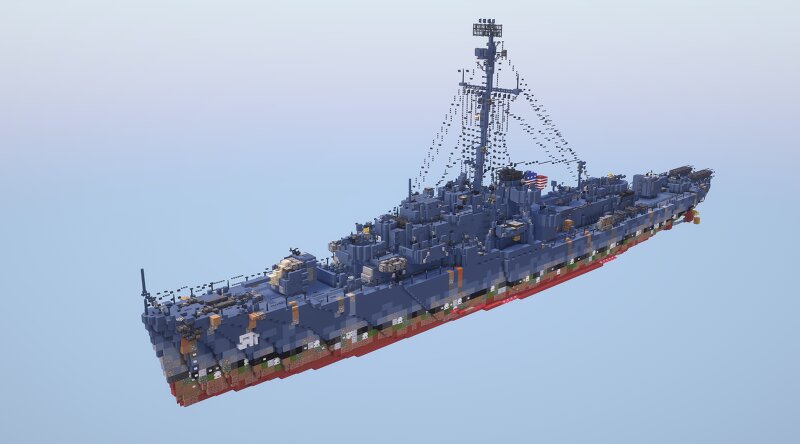
USS Rizzi (DE-537) John C. Butler-Class Destroyer Escort (1.5:1 Scale)
Creator: GARRETT2BY4 · 2026-09-25 · Maps · Free on Eaglercraft Studio
Download USS Rizzi (DE-537) John C. Butler-Class Destroyer Escort (1.5:1 Scale) — free Minecraft map. Created by GARRETT2BY4. Tagged destroyer, destroyer escort, download, john c butler class. Get the world/schematic file when available and explore more free maps on Eaglercraft Studio.
Creator notes
Rizzi was named in honor of Rosalio Mario Rizzi who was posthumously awarded the Navy and Marine Corps Medal for his heroism during rescue operations for Wasp (CV-7) survivors. The ship was laid down on 3 November 1943 by the Boston Navy Yard, Boston, Massachusetts; launched on 7 December 1943; and christened by Mrs. Theresa Rizzi, mother of Seaman First Class Rizzi and commissioned on 26 June 1945 with LCdr. E. K. Winn assuming command. IMPORTANT: Before pasting schematic input the following commands: //perf neighbors off //perf updates off //paste -e Texture Pack: Reflector's General Military Pack 2.0 Shaders Pack: Complimentary Unbound Game Version: Java 1.21.11 Please leave a diamond and follow if you enjoy this type of content! :)
Added value
What’s included on this page
Preview, categories, compatibility, and tools on this page — not a bare file mirror.
- Creator
- GARRETT2BY4
- Source
- Minecraft downloads library on Eaglercraft Studio
- Type
- Minecraft map / world
- Price
- Free download on Eaglercraft Studio
- Curation
- Listed with credit to GARRETT2BY4 · studio preview & install guide
- Compatible with
- Minecraft Java (match version / loader in facts)
- Tags
- Destroyer, Destroyer Escort, Download, John C Butler Class, Navy, Rizzi
Install guide
How to install this free Minecraft map
Eaglercraft Studio map listing with preview, creator credit, and install steps for Java worlds.
- 1Download the world archive (.zip / .mcworld / schematic) when available.
- 2For Java: extract into your .minecraft/saves folder (or import via your launcher).
- 3Launch Minecraft, select the world, and play. Keep a backup before overwriting saves.
Check any version notes in the facts panel — maps often target a specific Minecraft release.
Related free maps
More curated maps from the same library section.

CraftyFoxe · 761 diamonds · 418 views

CraftyFoxe · 761 diamonds · 339 views

CraftyFoxe · 761 diamonds · 319 views

CraftyFoxe · 761 diamonds · 306 views