
Veliky Grad - Medieval Slavic Kingdom | DOWNLOAD
Creator: MineDesigns · 2026-09-15 · Maps · Free on Eaglercraft Studio
Download Veliky Grad - Medieval Slavic Kingdom | DOWNLOAD — free Minecraft map. Created by MineDesigns. Tagged awesome, build, building, castle. Get the world/schematic file when available and explore more free maps on Eaglercraft Studio.
Creator notes
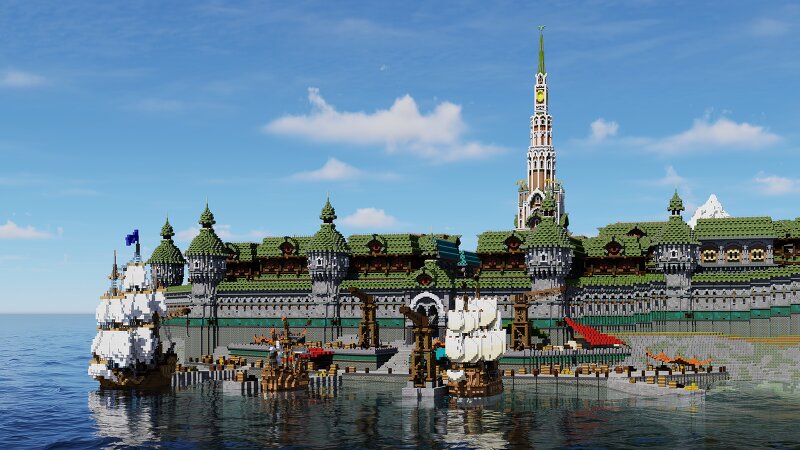
This build is inspired by the architecture of ancient Slavic cities and medieval Eastern Europe. I wanted to imagine what a small mountain town might look like after gradually growing into the capital of an entire kingdom. At the heart of the city stands the main cathedral, surrounded by a dense mix of wooden and stone houses. The city is enclosed by fortified walls with towers, with a small harbor and several churches scattered throughout. Beyond the city, the landscape opens up into mountains, forests, and smaller structures that help make the entire settlement feel more alive and connected. I paid special attention to the rooftops, decorative elements, and the combination of different materials. I wanted to preserve the feeling of an old city that had developed and changed over many years, rather than something that was built all at once. Some more Information: After subscribe, you can download all my maps ! Commercial use is prohibited without the permission of the copyright holder MineDesigns Join my discord Subscribe on YouTube Build your dreams with MineDesigns! Check out my other builds:
Added value
What’s included on this page
Preview, categories, compatibility, and tools on this page — not a bare file mirror.
- Creator
- MineDesigns
- Source
- Minecraft downloads library on Eaglercraft Studio
- Type
- Minecraft map / world
- Price
- Free download on Eaglercraft Studio
- Curation
- Listed with credit to MineDesigns · studio preview & install guide
- Compatible with
- Minecraft Java (match version / loader in facts)
- Tags
- Awesome, Build, Building, Castle, Cool, Custom
Install guide
How to install this free Minecraft map
Eaglercraft Studio map listing with preview, creator credit, and install steps for Java worlds.
- 1Download the world archive (.zip / .mcworld / schematic) when available.
- 2For Java: extract into your .minecraft/saves folder (or import via your launcher).
- 3Launch Minecraft, select the world, and play. Keep a backup before overwriting saves.
Check any version notes in the facts panel — maps often target a specific Minecraft release.
Related free maps
More curated maps from the same library section.

CraftyFoxe · 761 diamonds · 418 views

CraftyFoxe · 761 diamonds · 339 views

CraftyFoxe · 761 diamonds · 319 views

CraftyFoxe · 761 diamonds · 306 views