
VERATH: A Dark Lovecraftian RPG
Creator: Juther123 · 2026-09-22 · Maps · Free on Eaglercraft Studio
Download VERATH: A Dark Lovecraftian RPG — free Minecraft map. Created by Juther123. Tagged map, other, rpg, survival. Get the world/schematic file when available and explore more free maps on Eaglercraft Studio.
Creator notes
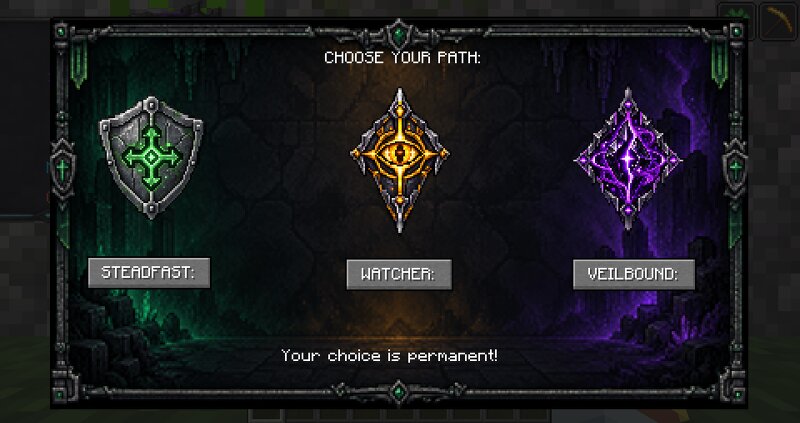
Verath Every kind of power has a cost. Verath is a dark fantasy Minecraft mod about magic, survival, and what happens when a player pushes too far. I’m building it around three connected systems—Sanity, Mana, and Corruption—so becoming stronger can also make the world more dangerous. Come Join The WIki! veyrath-field-archive.juther123.chatgpt.site What’s working so far Sanity and paranoia: Sanity ranges from 100 to -100. A clear mind has benefits, while low and negative Sanity bring unsettling effects along with risky Void powers. Mana with a twist: Players begin with a random Mana capacity. Sleeping refills Mana, Running out also causes Mana Sickness. Corruption: Using magic increases Corruption. Higher tiers grant power in darkness but bring harsher drawbacks in light. Three classes: Choose the protective Steadfast , the perceptive Watcher , or the Void-touched Veilbound . Each has its own active ability, and the choice is permanent. Character growth: Earn XP from monsters, level up toward a cap of 60, and invest points in five stats: Nerve, Awareness, Veil Attunement, Composure, and Pulse. Custom interfaces: Class selection, character stats, and the in-game HUD have their own da
Added value
What’s included on this page
Preview, categories, compatibility, and tools on this page — not a bare file mirror.
- Creator
- Juther123
- Source
- Minecraft downloads library on Eaglercraft Studio
- Type
- Minecraft map / world
- Price
- Free download on Eaglercraft Studio
- Curation
- Listed with credit to Juther123 · studio preview & install guide
- Compatible with
- Minecraft Java (match version / loader in facts)
- Tags
- Map, Other, Rpg, Survival
Install guide
How to install this free Minecraft map
Eaglercraft Studio map listing with preview, creator credit, and install steps for Java worlds.
- 1Download the world archive (.zip / .mcworld / schematic) when available.
- 2For Java: extract into your .minecraft/saves folder (or import via your launcher).
- 3Launch Minecraft, select the world, and play. Keep a backup before overwriting saves.
Check any version notes in the facts panel — maps often target a specific Minecraft release.
Related free maps
More curated maps from the same library section.

CraftyFoxe · 761 diamonds · 418 views

CraftyFoxe · 761 diamonds · 339 views

CraftyFoxe · 761 diamonds · 319 views

CraftyFoxe · 761 diamonds · 306 views