
Victorian Nether Hub | DOWNLOAD
Creator: MineDesigns · 2026-09-02 · Maps · Free on Eaglercraft Studio
Download Victorian Nether Hub | DOWNLOAD — free Minecraft map. Created by MineDesigns. Tagged awesome, build, building, cool. Get the world/schematic file when available and explore more free maps on Eaglercraft Studio.
Creator notes
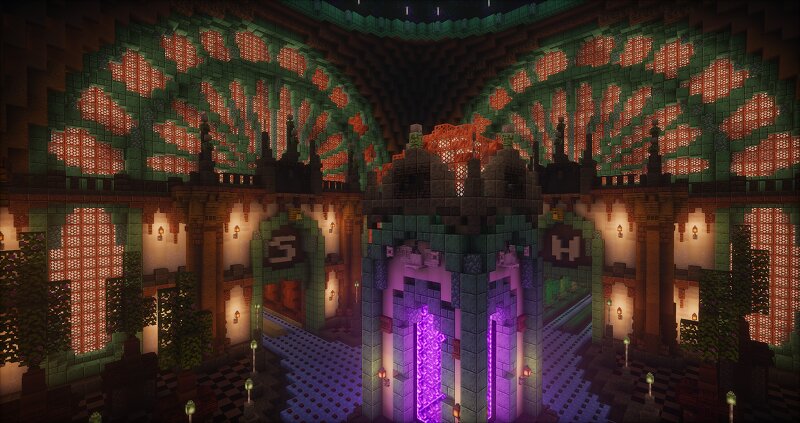
Victorian Nether Hub I wanted to build something that would feel like a place where Victorian architecture meets the Nether — elegant, massive and slightly unsettling. This Nether Hub combines dark stone, greenish prismarine details and huge glowing windows filled with the warm red light of the Nether. At the center is a large portal chamber, surrounded by symmetrical halls, balconies and decorative elements that make the whole build feel more like an ancient Victorian station than a simple Nether hub. The contrast between the warm interior lighting and the purple glow of the portal ended up being one of my favorite parts of the build. I also added plenty of small details, from trees and lanterns to the patterns in the floor and walls, to make the space feel like a real place rather than just a portal room. Some more Information: After subscribe, you can download all my maps ! Commercial use is prohibited without the permission of the copyright holder MineDesigns Join my discord Subscribe on YouTube Build your dreams with MineDesigns! Check out my other builds:
Added value
What’s included on this page
Preview, categories, compatibility, and tools on this page — not a bare file mirror.
- Creator
- MineDesigns
- Source
- Minecraft downloads library on Eaglercraft Studio
- Type
- Minecraft map / world
- Price
- Free download on Eaglercraft Studio
- Curation
- Listed with credit to MineDesigns · studio preview & install guide
- Compatible with
- Minecraft Java (match version / loader in facts)
- Tags
- Awesome, Build, Building, Cool, Custom, Download
Install guide
How to install this free Minecraft map
Eaglercraft Studio map listing with preview, creator credit, and install steps for Java worlds.
- 1Download the world archive (.zip / .mcworld / schematic) when available.
- 2For Java: extract into your .minecraft/saves folder (or import via your launcher).
- 3Launch Minecraft, select the world, and play. Keep a backup before overwriting saves.
Check any version notes in the facts panel — maps often target a specific Minecraft release.
Related free maps
More curated maps from the same library section.

CraftyFoxe · 761 diamonds · 418 views

CraftyFoxe · 761 diamonds · 339 views

CraftyFoxe · 761 diamonds · 319 views

CraftyFoxe · 761 diamonds · 306 views