
WillowSkyline: Creeper Creek Drive-in
Creator: WillowSkyline · 2026-09-07 · Maps · Free on Eaglercraft Studio
Download WillowSkyline: Creeper Creek Drive-in — free Minecraft map. Created by WillowSkyline. Tagged architecture, builds, city, community. Get the world/schematic file when available and explore more free maps on Eaglercraft Studio.
Creator notes
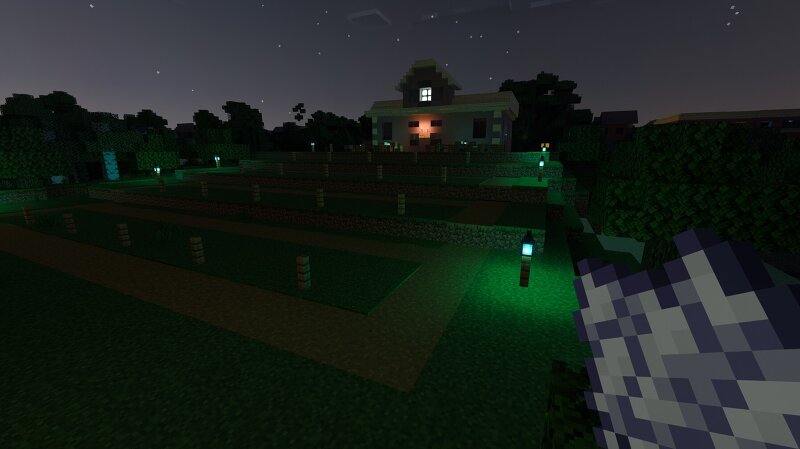
PIXEL PICTURES TONIGHTS FEATURE Creeper Creek Drive-in My first drive-in theater build! I decided to build my first drive-in movie theater as part of my Minecraft city! I wanted to create a place that felt like an actual part of the city, with large movie screen, parking area, fenced-in grounds, lighting, and a small theater building to get some delicious popcorn and your favorite potion pop. I also give the theater a completely different atmosphere at night. this is still a work in progress, and I'm planning to keep improving the theater and adding more details to the surrounding areas. what do you think? id especially love some suggestions for what I should put on the movie screen and any other details I should add to the drive-in! Also, would love to get more ides on learning how to do better with making words in Minecraft as well!
Added value
What’s included on this page
Preview, categories, compatibility, and tools on this page — not a bare file mirror.
- Creator
- WillowSkyline
- Source
- Minecraft downloads library on Eaglercraft Studio
- Type
- Minecraft map / world
- Price
- Free download on Eaglercraft Studio
- Curation
- Listed with credit to WillowSkyline · studio preview & install guide
- Compatible with
- Minecraft Java (match version / loader in facts)
- Tags
- Architecture, Builds, City, Community, Creative, Entertainment
Install guide
How to install this free Minecraft map
Eaglercraft Studio map listing with preview, creator credit, and install steps for Java worlds.
- 1Download the world archive (.zip / .mcworld / schematic) when available.
- 2For Java: extract into your .minecraft/saves folder (or import via your launcher).
- 3Launch Minecraft, select the world, and play. Keep a backup before overwriting saves.
Check any version notes in the facts panel — maps often target a specific Minecraft release.
Related free maps
More curated maps from the same library section.

CraftyFoxe · 761 diamonds · 418 views

CraftyFoxe · 761 diamonds · 339 views

CraftyFoxe · 761 diamonds · 319 views

CraftyFoxe · 761 diamonds · 306 views